Contents
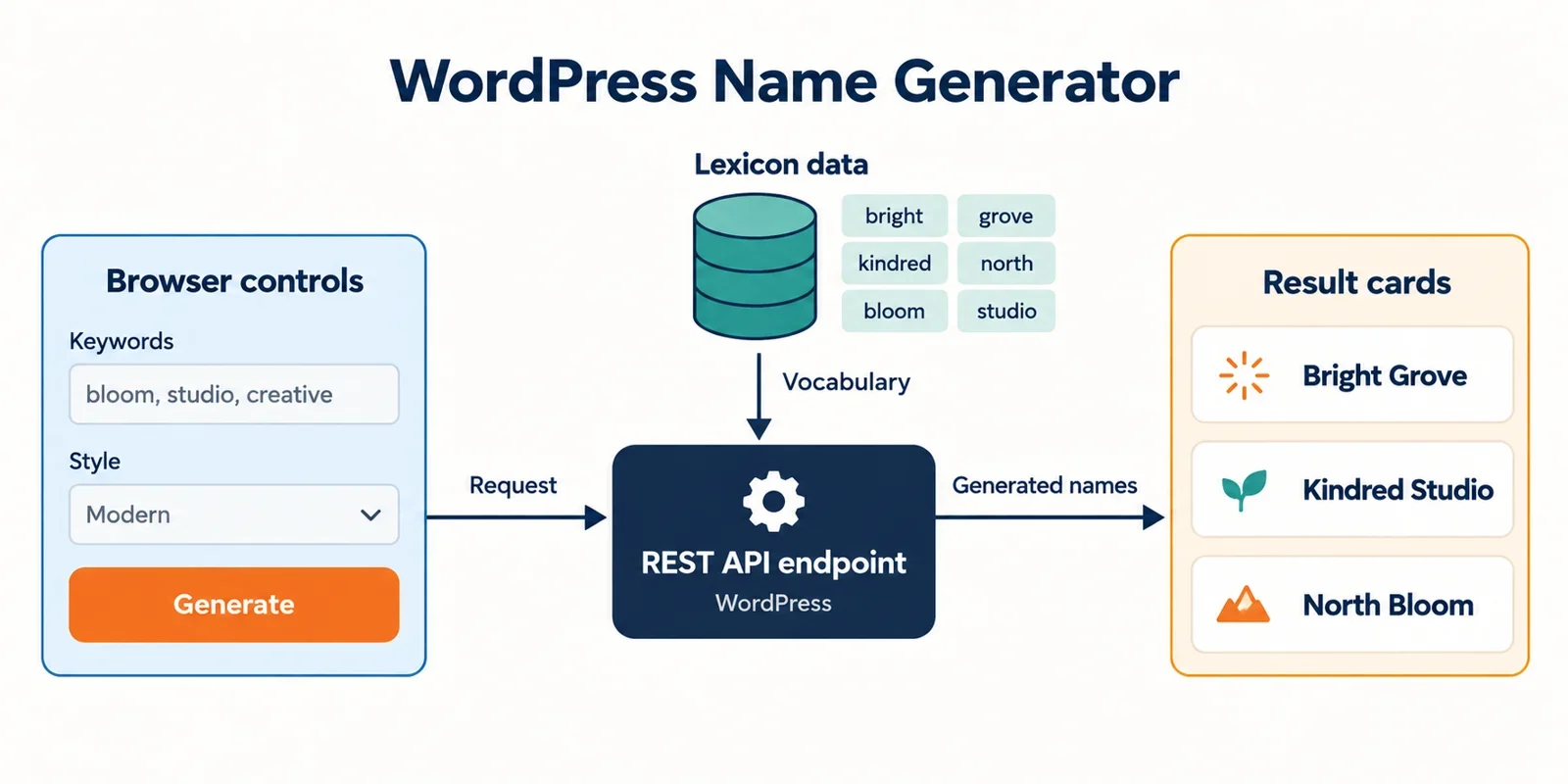
A name generator on WordPress is three problems wearing one coat: a lexicon that editors can maintain, a generator that returns results without a page reload, and a handful of small features that make people come back. Almost every other decision — custom post type versus custom table, transport, caching, migration — follows from those three.
This guide lays out an architecture for mygenify.cloud as a custom theme plus a small companion plugin, then compares admin-ajax.php with the REST API for the one endpoint that actually matters. The short version: register a namespaced route such as /wp-json/mygenify/v1/generate, validate parameters with a declared schema, call it with apiFetch or fetch, and keep admin-ajax.php only as a compatibility path for hosts or security plugins that block /wp-json/. Generated names stay ephemeral; only lexicon components are stored.
The reference site named in the brief is treated here as a functional reference for the input → generate → filter → copy/favorite loop only. Its visual design is out of scope, and the mapping below is a functional sketch to verify against the live site rather than an audited teardown of it.
Architecture at a glance: theme plus companion plugin
Split responsibilities cleanly. The theme owns templates, CSS, and the front-end bundle. A small companion plugin owns everything that must survive a theme switch: the lexicon data model, the generator service, the REST controller, the rate limiter, and the admin-ajax shim.
The most important piece is a plain PHP service class that knows nothing about HTTP:
class MYG_Generator {
    /**
     * @param array $args Already normalized and validated.
     * @return array{names: string[], meta: array}
     */
    public static function generate( array $args ): array {
        // Pure generation logic. No $_GET, no $_POST, no nonces.
    }
}
Both the REST controller and the legacy AJAX callback call MYG_Generator::generate(). That single decision eliminates the most common failure mode in WordPress utility sites: two transport layers that slowly drift apart because each one re-implements filtering and output shaping.
Add one more shared piece — a parameter normalizer — so validation also lives in exactly one place:
class MYG_Params {
    public static function normalize( array $raw ): array {
        return array(
            'style'       => in_array( $raw['style'] ?? '', MYG_Styles::keys(), true ) ? $raw['style'] : 'modern',
            'count'       => max( 1, min( 50, absint( $raw['count'] ?? 12 ) ) ),
            'starts_with' => mb_substr( sanitize_text_field( $raw['starts_with'] ?? '' ), 0, 1 ),
        );
    }
}
The theme enqueues a single JS file and passes configuration through wp_add_inline_script or wp_localize_script: the REST URL, a nonce, the transport preference, and the maximum result count. Nothing else in the theme needs to know how generation works.
Data model and WordPress admin management
The governing rule: store lexicon components, not generated names. A name produced at request time is ephemeral — it should never become a row in wp_posts. Storing outputs bloats the database, makes caching harder, and gives editors nothing useful to maintain.
CPT with taxonomies — the default for curated sets. If the lexicon is a few hundred to a few thousand hand-curated rows, a custom post type is the right home. Editors get the list table, revisions, search, and bulk actions for free. Use taxonomies for the dimensions you filter on (slot: prefix / root / suffix; style or genre; free-form tags) and post meta for scalar attributes such as syllable count or a frequency weight. Expose the type through REST with show_in_rest and a rest_base so import tooling and the block editor can read it.
add_action( 'init', 'myg_register_lexicon' );
function myg_register_lexicon() {
    register_post_type( 'myg_lexicon', array(
        'labels'                => array( 'name' => 'Lexicon', 'singular_name' => 'Lexicon Entry' ),
        'public'                => false,
        'show_ui'               => true,
        'show_in_rest'          => true,
        'rest_base'             => 'lexicon',
        'rest_controller_class' => 'MYG_Lexicon_Controller',
        'supports'              => array( 'title', 'custom-fields' ),
        'capability_type'       => 'post',
        'map_meta_cap'          => true,
    ) );

    register_taxonomy( 'myg_slot', 'myg_lexicon', array(
        'label'        => 'Slot',
        'public'       => false,
        'show_ui'      => true,
        'show_in_rest' => true,
        'rest_base'    => 'lexicon-slot',
        'hierarchical' => true,
    ) );
}
Important correction to a common assumption: public => false does not make the REST route private. show_in_rest => true registers a real endpoint, and public only governs front-end querying and URL generation. If you want the lexicon readable only by authenticated editors, say so explicitly with a controller that overrides the permission checks:
class MYG_Lexicon_Controller extends WP_REST_Posts_Controller {
    public function get_items_permissions_check( $request ) {
        return current_user_can( 'edit_posts' )
            ? true
            : new WP_Error( 'myg_forbidden', 'Lexicon is not public.', array( 'status' => 401 ) );
    }

    public function get_item_permissions_check( $request ) {
        return $this->get_items_permissions_check( $request );
    }
}
That keeps the block editor working for editors while closing the collection to anonymous requests. The alternative — show_in_rest => false plus a hand-registered read-only route with its own permission_callback — is fine too, but then you own pagination and schema yourself.
Custom table or JSON-backed option — the escape hatch for large matrices. Once you pass roughly tens of thousands of rows, or the data is regenerated from CSV on a schedule, post meta queries become the bottleneck. Two options:
- A dedicated table, e.g.
{$wpdb->prefix}myg_lexiconwith columns forslot,value,style,weight. Fast to query, easy to index on(slot, style), importable in bulk with a single batched insert. - A JSON snapshot stored in an option and loaded once per request into the object cache. Simple and versionable in Git, but only sensible when the dataset is read-only between deploys and fits comfortably in memory.
Admin workflows. Let editors curate in Gutenberg. For bulk operations, add one admin page with a CSV upload that validates headers, previews the first rows, and imports in batches — or ship a WP-CLI command if your operators live on the command line. Export matters as much as import: a lexicon you cannot back up is a lexicon you cannot safely edit.
Front-end generation and instant results
The front end is a form plus a results region. No page reload, no full template re-render.
Controls. Keep the visible inputs to what actually changes output: style or genre, syllable or length range, optional starting letter, and a result count. Everything else — seed, exclusions, duplicate handling — belongs behind an "advanced" disclosure.
Request shape. Prefer GET with query parameters over a POST body. It keeps the request cacheable at the page-cache and CDN layers, makes result sets shareable through a URL, and lets you reproduce a bug by pasting a link:
/wp-json/mygenify/v1/generate?style=fantasy&count=12&starts_with=a
Rendering. Disable the submit button, show a skeleton in the results region, and render cards when the promise resolves. Use an AbortController so rapid parameter changes cancel in-flight requests instead of racing to paint stale results.
async function generate( params, signal ) {
  const url = new URL( mygenify.restUrl );
  Object.entries( params ).forEach( ( [ k, v ] ) => url.searchParams.set( k, v ) );

  const res = await fetch( url, {
    signal,
    credentials: 'same-origin',
    headers: { 'X-WP-Nonce': mygenify.nonce },
  } );

  if ( res.status === 429 ) throw new Error( 'rate-limited' );
  if ( ! res.ok ) throw new Error( 'request-failed' );
  return res.json();
}
States. Three of them, all explicit: loading (skeleton), empty ("no names matched — try widening the style"), and error (inline message with a retry button). A 429 should say "too many requests, wait a moment" rather than surfacing a raw status code. Put aria-live="polite" on the results container so screen readers announce the new set.
Card markup. Each card needs a stable wrapper, the name as a heading, optional metadata (style, syllable count), and two buttons: copy and favorite. Give the favorite button aria-pressed and update it on toggle — that is the difference between a usable control and a decorative one. Because cards are injected rather than server-rendered, attach listeners once on the results container via event delegation instead of rebinding on every render.
admin-ajax.php vs REST API for generator requests
Both transports boot WordPress. The differences that matter are context, contract, and cacheability.
| Dimension | admin-ajax.php | REST API |
|---|---|---|
| Bootstrap | Loads WordPress in an admin context, including admin-side includes | Standard REST request, no admin bootstrap |
| Caching | Conventionally POST; page cache and CDN usually bypass it | GET responses cacheable at page cache, CDN, and object cache |
| Contract | Ad-hoc $_POST/$_GET keys, validated by hand in each callback |
Declarative args schema with type, enum, min/max, sanitize |
| Auth | check_ajax_referer() plus manual capability checks |
permission_callback plus nonce via X-WP-Nonce |
| Discoverability | None — action names are strings in JS | /wp-json/ index, self-documenting routes |
| Tooling | jQuery $.post, hand-rolled fetch |
apiFetch, fetch, WP-CLI, external clients |
| Failure mode | A typo in the action name returns 0 silently |
rest_no_route with a 404 and a message |
Performance shape. The raw PHP execution difference is smaller than folklore suggests — both paths bootstrap the full WordPress stack. The real costs are structural. admin-ajax.php pays for admin context on every anonymous visitor request, and its POST convention makes it invisible to page caching and most CDNs. A cached GET to a REST route can be served without touching PHP at all, which is the only optimization that scales linearly with traffic. Measure p50 and p95 latency on the actual target host before choosing; shared hosting and object-cache availability change the answer.
Maintainability. REST controller classes centralize route registration, request handling, schema, and response shaping in one place, which is materially easier to keep coherent than scattered admin-ajax callbacks. admin-ajax handlers tend to accumulate in functions.php as wp_ajax_* and wp_ajax_nopriv_* pairs, each with its own sanitization and no shared contract. When you add a filter dimension six months from now, the controller tells you where it goes.
Security. The REST layer validates and sanitizes parameters against the declared schema before your callback runs, and rejects out-of-range values with a structured error. With admin-ajax you own every check, on every action, forever. REST also gives you permission_callback as a single, auditable gate per route. Global REST parameters such as _fields also let you keep response payloads small and predictable, which matters more as the result schema grows.
Migration. The honest case for admin-ajax is legacy: existing actions, existing jQuery code, and hosts where /wp-json/ is blocked by a security plugin or broken rewrite rules. That is a compatibility problem, not an architectural preference. For new work on mygenify.cloud, make REST the primary transport and treat admin-ajax as a shim.
Security and abuse controls
A public generator endpoint is an invitation to scripted abuse. Layer the defenses.
Schema validation first. Declare every parameter with a type, a default, and a bound. Enums for style values, minimum/maximum for counts, sanitize_callback for free text. Reject unknown combinations explicitly rather than silently ignoring them.
add_action( 'rest_api_init', function () {
    register_rest_route( 'mygenify/v1', '/generate', array(
        'methods'             => WP_REST_Server::READABLE,
        'permission_callback' => '__return_true', // Public read endpoint.
        'callback'            => function ( WP_REST_Request $request ) {
            if ( ! MYG_Rate_Limiter::allow( MYG_Rate_Limiter::client_key() ) ) {
                $error = new WP_Error( 'myg_rate_limited', 'Too many requests.', array( 'status' => 429 ) );
                return $error;
            }
            $result   = MYG_Generator::generate( MYG_Params::normalize( $request->get_params() ) );
            $response = new WP_REST_Response( $result, 200 );
            $response->header( 'Cache-Control', 'public, max-age=300' );
            return $response;
        },
        'args' => array(
            'style' => array(
                'type'    => 'string',
                'default' => 'modern',
                'enum'    => array( 'modern', 'classic', 'fantasy', 'tech' ),
            ),
            'count' => array(
                'type'    => 'integer',
                'default' => 12,
                'minimum' => 1,
                'maximum' => 50,
            ),
            'starts_with' => array(
                'type'              => 'string',
                'default'           => '',
                'sanitize_callback' => 'sanitize_text_field',
            ),
        ),
    ) );
} );
Rate limiting. Use a sliding-window counter keyed by a salted hash of the client IP plus the route. Transients work on small sites; if an object cache is available, back the counter with it so the limiter does not itself become a database bottleneck. Return 429 with a Retry-After header and make the front end handle that status gracefully. Cap count low enough that a single request can never return an unbounded payload.
Caching versus rate limiting. A page cache or CDN sitting in front of the route will serve repeats without invoking PHP, which means the limiter only sees cache misses. That is usually the behavior you want, but it also means the limiter’s numbers understate real traffic — log cache hits separately if you need the full picture.
Nonces and capabilities. Send X-WP-Nonce from the front end so cookie-authenticated users are recognized and logged-in state is available. Do not treat a nonce as the abuse control for a public read endpoint: for logged-out visitors the nonce value is effectively identical across all of them, so it is not a CSRF or rate boundary there. Rate limiting is. Any route that writes state — favorites, lexicon import — needs permission_callback returning is_user_logged_in() or a capability check such as edit_posts, plus its own args schema.
Exposure hygiene. Keep the lexicon CPT out of public queries and, more importantly, gate its REST routes explicitly as shown above. Never return raw component lists in the generate response — return only the assembled names and minimal metadata. Log internal errors server-side and return generic messages to the client.
Retention features: copy and favorites
These are small features that disproportionately affect whether people come back.
One-click copy. Use navigator.clipboard.writeText() with a fallback to a temporarily inserted textarea when the Clipboard API is unavailable or permission is denied. Swap the button label to "Copied" for about 1.5 seconds, keep focus on the button, and announce the change through an aria-live region. Copy should work from the card without any network request.
Anonymous favorites. Store an array in localStorage under a namespaced key, e.g. mygenify:favorites, with entries shaped { name, style, ts }. Cap the list (a couple hundred entries is plenty) and evict oldest-first. Render a favorites drawer from the same store so the UI stays consistent. This requires zero server work and survives reloads.
Logged-in favorites. Store them in user meta and expose a small namespaced route — with a declared schema, not an ad-hoc read of the request body:
register_rest_route( 'mygenify/v1', '/favorites', array(
    array(
        'methods'             => WP_REST_Server::READABLE,
        'permission_callback' => function () { return is_user_logged_in(); },
        'callback'            => function () {
            $favs = get_user_meta( get_current_user_id(), 'myg_favorites', true );
            return rest_ensure_response( $favs ? array_values( $favs ) : array() );
        },
    ),
    array(
        'methods'             => WP_REST_Server::CREATABLE,
        'permission_callback' => function () { return is_user_logged_in(); },
        'args'                => array(
            'name' => array(
                'type'              => 'string',
                'required'          => true,
                'minLength'         => 1,
                'maxLength'         => 80,
                'sanitize_callback' => 'sanitize_text_field',
                'validate_callback' => function ( $value ) {
                    return is_string( $value ) && '' !== trim( $value ) && mb_strlen( trim( $value ) ) <= 80;
                },
            ),
            'style' => array(
                'type'    => 'string',
                'default' => 'unknown',
                'enum'    => array( 'modern', 'classic', 'fantasy', 'tech', 'unknown' ),
            ),
        ),
        'callback'            => function ( WP_REST_Request $request ) {
            $name = trim( $request->get_param( 'name' ) );
            $key  = md5( strtolower( $name ) );
            $favs = get_user_meta( get_current_user_id(), 'myg_favorites', true );
            $favs = is_array( $favs ) ? $favs : array();

            $favs[ $key ] = array(
                'name'  => $name,
                'style' => $request->get_param( 'style' ),
                'ts'    => time(),
            );
            update_user_meta( get_current_user_id(), 'myg_favorites', $favs );
            return rest_ensure_response( array_values( $favs ) );
        },
    ),
) );
The schema does the first pass — required, bounded length, sanitized, enumerated style — and the validate_callback catches the case a length bound cannot: a string of whitespace. Keying by a lowercased hash of the name makes the write idempotent, so favoriting the same name twice does not create duplicates. On login, offer a one-time prompt to merge local favorites into user meta rather than doing it silently.
Migration and fallback plan
Version the namespace from day one: /mygenify/v1/generate. Inside v1, response shape is a contract — add fields, never rename or remove them. Breaking changes go to v2, with v1 maintained until traffic drops.
The admin-ajax shim. Register both authenticated and anonymous actions and delegate to the same generator service. Crucially, route parameters through the same normalizer rather than re-implementing validation in the shim:
add_action( 'wp_ajax_myg_generate', 'myg_ajax_generate' );
add_action( 'wp_ajax_nopriv_myg_generate', 'myg_ajax_generate' );

function myg_ajax_generate() {
    check_ajax_referer( 'myg_generate', 'nonce' );

    if ( ! MYG_Rate_Limiter::allow( MYG_Rate_Limiter::client_key() ) ) {
        wp_send_json_error( array( 'code' => 'rate_limited' ), 429 );
    }

    $args   = MYG_Params::normalize( wp_unslash( $_GET ) );
    $result = MYG_Generator::generate( $args );

    header( 'X-MYG-Deprecated: use /wp-json/mygenify/v1/generate' );
    wp_send_json_success( $result );
}
The deprecation header lets you measure how much traffic still uses the shim before removing it.
Feature-flag the transport. Store an option such as myg_transport with values rest, ajax, or auto, and pass it to the front end. In JS, wrap both paths behind one adapter function: try REST, and on a 404 or 403 fall back to admin-ajax once, remembering the result for the session. That covers hosts where /wp-json/ is blocked without hard-coding the decision into the bundle.
Verify availability with a dedicated health route — not the generate route. Pinging /generate from a monitor or deploy script consumes rate-limit budget and warms cache entries with a synthetic parameter set you never wanted cached. Register a separate, unthrottled, uncached endpoint:
register_rest_route( 'mygenify/v1', '/health', array(
    'methods'             => WP_REST_Server::READABLE,
    'permission_callback' => '__return_true',
    'callback'            => function () {
        $response = rest_ensure_response( array( 'ok' => true, 'version' => MYG_VERSION ) );
        $response->header( 'Cache-Control', 'no-store, max-age=0' );
        return $response;
    },
) );
A deploy check that requests /wp-json/mygenify/v1/health catches the two most common failures — rewrite rules that need flushing and security plugins that block REST — before users do.
Reference-site functionality mapping
The brief names bluestudio.cloud as a functional reference, not a design reference. What follows is a functional sketch based on that stated flow — inputs, generate, filter, copy/favorite — and should be verified against the live site before it is treated as a specification. Nothing here asserts how that site’s internals are implemented.
| Reference behavior (to verify) | mygenify.cloud implementation |
|---|---|
| Input controls for style and constraints | Theme form controls; values map directly to the REST args schema |
| Generate action | GET /wp-json/mygenify/v1/generate via fetch, no reload |
| Filtering of results | Narrower request parameters, or client-side filtering of the returned set for cheap predicates |
| Result cards | Theme card component with name, metadata, copy, favorite |
| Copy | navigator.clipboard with fallback and transient confirmation |
| Favorite / save | localStorage for anonymous, user meta via REST for logged-in users |
What you replicate is the interaction loop: choose conditions, get a fresh set instantly, refine, keep the good ones. What you do not replicate is layout, typography, color, iconography, or copy. Those are yours to design, and reproducing them would be both a brand and a legal problem.
One deliberate divergence worth considering: make each generated set shareable through a URL by encoding parameters (and optionally a seed) in the query string. That turns every result set into a potential entry point, which a purely POST-based generator cannot do. Decide separately whether such pages should be indexable — a generator that emits unlimited indexable permutations invites thin-content penalties.
Decisions to lock and what to measure before launch
Answer these before writing the controller, because each one changes the data model or the transport:
- How many lexicon rows and filter dimensions at launch? Under a few thousand with an editorial workflow, use the CPT. Above that, plan the custom table from the start.
- Generated combinatorially at request time, or prebuilt and stored? Default to combinatorial. Store a name only if it must be reviewed or has a persistent identity.
- Is generation public and anonymous? If yes, the rate limit is a product decision, not just a technical one — pick a number your hosting can sustain.
- Does the host or any security plugin disable
/wp-json/? Test with a plain request on staging, not in production. - Do favorites need to work for logged-out users? If yes, localStorage is mandatory, not optional.
- Do you need shareable or SEO-indexable result URLs? If yes, encode parameters in the query string and decide whether result pages should be indexable at all.
- Should editors manage lexicons in Gutenberg or a custom admin table? Gutenberg for curation, a custom table for bulk import and export.
- What is the migration deadline for any existing admin-ajax actions? Set one, or the shim becomes permanent.
- Do you need bulk import and export? If yes, build it in the first sprint — retrofitting it after the lexicon grows is painful.
- Which caching layer is available — object cache, page cache, or CDN? This determines whether rate limiting uses transients or a custom table, and whether REST
GETresponses can be cached at the edge.
Then measure, on the target host, with realistic data: p50 and p95 latency for the generate endpoint, cache hit rate for repeated parameter sets, and the share of requests hitting the rate limiter. A generator that feels instant at 50ms and sluggish at 600ms is a different product, and you will not know which one you have until you measure it where it runs. Treat the health route as the always-green signal and the generate latency as the metric you actually tune.