In this guide
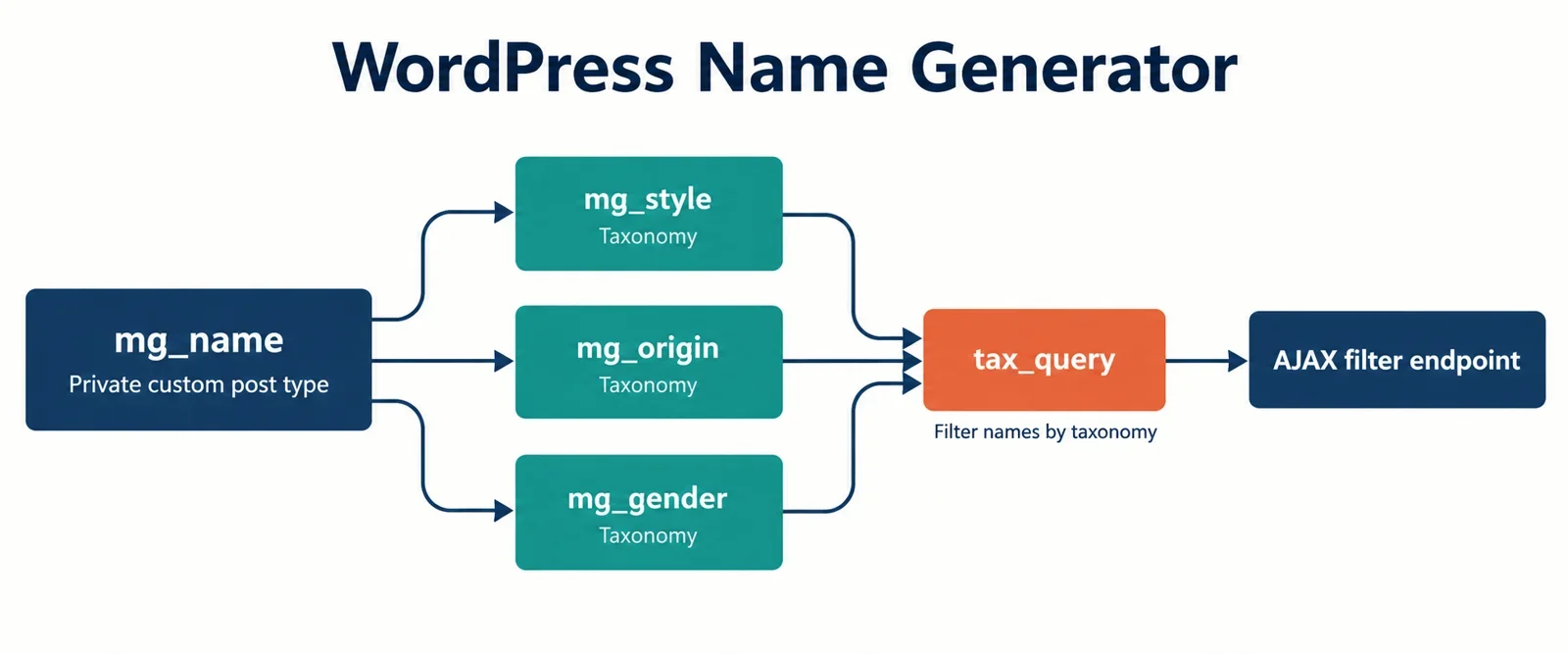
A name generator has two jobs: it must hold a corpus of names that editors can manage, and it must answer filter combinations quickly enough that the page feels instant. WordPress can do both without a custom database table if the data model is deliberate. The practical shape is one custom post type for names, custom taxonomies for the dimensions users filter by, and post meta for display-only attributes.
The functional target is a generate-then-filter loop: the visitor picks a style, an origin, and a gender, gets a result, copies it, and keeps a shortlist. The brief points to bluestudio.cloud as a functional reference for that loop rather than a design reference; the templates, tokens, and interaction patterns below stay our own.
This guide walks through the data model, taxonomy registration, bulk import workflow, tax_query construction, the AJAX response shape, copy and favorites behavior, archive SEO, and caching guardrails for a site like mygenify.cloud.
Data model: CPT for names, taxonomies for filter dimensions
Start with one row per name in a custom post type, for example mg_name. A single JSON blob inside an option or one page looks convenient for a tiny static list, but it stops being convenient as soon as the generator needs filtering, pagination, admin editing, or term counts. A CPT gives each name an ID, a title, a status, a REST representation, and a native editing screen. It also lets WP_Query do the filtering work.
Use custom taxonomies for the dimensions that appear as generator controls. For this project that means mg_style for Modern, Fantasy, and Vintage; mg_origin for Latin, Norse, Japanese, and similar groups; and mg_gender for Neutral, Feminine, and Masculine. A taxonomy is the parent grouping and its terms are the children, so a Style taxonomy can hold many style terms. Terms are many-to-many with posts and unique within their taxonomy, which means one name can be tagged Modern, Latin, and Neutral at the same time while each term is stored once.
Custom taxonomies also keep the name corpus separate from blog categories and tags. That separation matters on a utility site: editorial posts should not share term lists with generator filters, and editors should not see blog categories in the name editor. Each taxonomy gets its own admin menu and its own term management screen.
Put scalar attributes in post meta: pronunciation, syllable count, popularity score, SEO slug, and a normalized duplicate-check key. These values are displayed on the result card or used for sorting, but they are not filter dimensions. If a field will become a checkbox, radio group, or multi-select in the generator UI, model it as a taxonomy. If it only appears on the card or drives ordering, keep it in meta. Optional dimensions such as mg_length and mg_letter can be non-hierarchical tags when users genuinely filter by them; otherwise they add term bloat without query value.
Registering the filter taxonomies in a plugin
Register the post type and taxonomies in a small site plugin on the init hook. The post type argument is where each taxonomy attaches to mg_name. Keep the registration code in one file so the data model is versioned with the site rather than hidden in the theme.
add_action('init', function () {
    register_post_type('mg_name', [
        'label' => 'Names',
        'public' => true,
        'publicly_queryable' => true,
        'exclude_from_search' => true,
        'show_in_rest' => true,
        'supports' => ['title', 'editor', 'custom-fields'],
        'rewrite' => ['slug' => 'names'],
    ]);

    register_taxonomy('mg_style', ['mg_name'], [
        'label' => 'Styles',
        'public' => true,
        'hierarchical' => false,
        'show_admin_column' => true,
        'show_in_rest' => true,
        'query_var' => true,
        'rewrite' => ['slug' => 'names/style'],
    ]);

    register_taxonomy('mg_origin', ['mg_name'], [
        'label' => 'Origins',
        'public' => true,
        'hierarchical' => true,
        'show_admin_column' => true,
        'show_in_rest' => true,
        'query_var' => true,
        'rewrite' => ['slug' => 'names/origin'],
    ]);

    register_taxonomy('mg_gender', ['mg_name'], [
        'label' => 'Genders',
        'public' => true,
        'hierarchical' => false,
        'show_admin_column' => true,
        'show_in_rest' => true,
        'query_var' => true,
        'rewrite' => ['slug' => 'names/gender'],
    ]);
});
Style and gender are flat because nesting adds no practical value. Origin is hierarchical because a tree such as European > Nordic > Icelandic is useful when editors want to browse broadly but still tag precisely. Setting hierarchical => true makes the taxonomy behave like categories; flat taxonomies suit dimensions where every term is a peer.
Enable query_var and a rewrite slug when the same taxonomy should power both AJAX filters and public archive URLs such as /names/origin/norse/. Enable show_in_rest if the block editor, a headless front end, or a JS admin tool needs term endpoints. If the corpus is strictly internal, set public and publicly_queryable to false, but then do not expect public taxonomy archives. Choose that trade-off deliberately.
Admin workflow and bulk term management
Editors should add a name in the title field, assign style, origin, and gender in the taxonomy metaboxes, and fill the display meta fields in a small meta box. The taxonomy admin columns make the list table readable without opening every post. Keep the editor simple: the name title, three term boxes, and a compact meta panel are enough for day-to-day work.
Bulk import is the part that decides whether the admin stays usable. Do not hand-edit thousands of posts. Accept CSV or JSON through a WP-CLI command or an admin importer, normalize each name into a duplicate key, and skip rows that already exist. Store the normalized key in post meta, for example _mg_name_key, and query it before inserting. That is more reliable than relying only on the post title, because titles can be edited later.
wp_defer_term_counting(true);
foreach ($rows as $row) {
    $name = sanitize_text_field($row['name']);
    $key = sanitize_title($name);
    $existing = get_posts([
        'post_type' => 'mg_name',
        'post_status' => 'any',
        'fields' => 'ids',
        'meta_key' => '_mg_name_key',
        'meta_value' => $key,
        'posts_per_page' => 1,
    ]);
    if ($existing) {
        continue;
    }
    $post_id = wp_insert_post([
        'post_type' => 'mg_name',
        'post_status' => 'publish',
        'post_title' => $name,
    ]);
    if (is_wp_error($post_id)) {
        continue;
    }
    update_post_meta($post_id, '_mg_name_key', $key);

    $fields = ['mg_style' => 'styles', 'mg_origin' => 'origins', 'mg_gender' => 'genders'];
    foreach ($fields as $taxonomy => $field) {
        $term_ids = [];
        foreach ((array) ($row[$field] ?? []) as $label) {
            $label = trim($label);
            if ($label === '') {
                continue;
            }
            $term = term_exists($label, $taxonomy);
            if (!$term) {
                $term = wp_insert_term($label, $taxonomy);
            }
            if (is_wp_error($term)) {
                continue;
            }
            $term_ids[] = (int) (is_array($term) ? $term['term_id'] : $term);
        }
        if ($term_ids) {
            wp_set_object_terms($post_id, $term_ids, $taxonomy, false);
        }
    }
}
wp_defer_term_counting(false);
Create missing terms deliberately. Use term_exists() before wp_insert_term() so import files do not create near-duplicate terms with different capitalization. Pass the resolved term IDs to wp_set_object_terms() instead of raw labels, because passing labels lets WordPress create terms implicitly and bypasses that check. During large imports, defer term counting and run the import in batches. After the import, recount terms and clear any cached filter results. This keeps the admin responsive and prevents term counts from drifting.
Translating UI selections into a tax_query
The front end should send term IDs, not display labels. Each control can carry a data-taxonomy and data-term-id, or the JS can read checked inputs and build arrays keyed by dimension. The endpoint then builds one tax_query with relation => 'AND' across taxonomies. Within a single taxonomy, pass multiple term IDs in a terms array with operator => 'IN'; that produces OR behavior inside the dimension and AND behavior across dimensions.
function mg_build_tax_query(array $selected): array {
    $tax_query = ['relation' => 'AND'];
    $map = [
        'style' => 'mg_style',
        'origin' => 'mg_origin',
        'gender' => 'mg_gender',
    ];
    foreach ($map as $key => $taxonomy) {
        $ids = array_values(array_filter(array_map('absint', (array) ($selected[$key] ?? []))));
        if (!$ids) {
            continue;
        }
        $tax_query[] = [
            'taxonomy' => $taxonomy,
            'field' => 'term_id',
            'terms' => $ids,
            'operator' => 'IN',
            'include_children' => $taxonomy === 'mg_origin',
        ];
    }
    return $tax_query;
}
A query for Modern or Fantasy, plus Norse, plus Neutral becomes: mg_style IN (Modern, Fantasy) AND mg_origin IN (Norse) AND mg_gender IN (Neutral). That is exactly the behavior users expect from a multi-select filter. If the origin taxonomy is hierarchical, include_children => true lets a parent selection such as European include Nordic and Icelandic names.
Build the WP_Query with a sensible page size, published status, and an explicit order. Avoid orderby => rand on a large corpus unless the result set is already narrow. If a combination returns zero names, do not return a blank panel. Relax the least important dimension, show a short explanation, and offer related terms or a reset action. The fallback should be deterministic so users understand why they are seeing broader results.
Instant results: AJAX or REST plus template parts
For a same-origin theme, admin-ajax.php is the shortest path. For a headless front end, a block, or a future mobile client, register_rest_route() is cleaner. Either way, return both rendered HTML and a JSON payload. HTML gives the page an immediate result grid without duplicating card markup in JavaScript. JSON gives copy and favorite actions stable IDs and display names, while the term chips stay in the rendered HTML where they belong.
Localize the endpoint URL and a nonce when enqueueing the script. In the handler, verify the nonce, sanitize the selected term IDs, run the query, and render the same template part used on initial page load.
add_action('wp_ajax_mg_filter_names', 'mg_filter_names');
add_action('wp_ajax_nopriv_mg_filter_names', 'mg_filter_names');
function mg_filter_names() {
    check_ajax_referer('mg_filter', 'nonce');
    $selected = [
        'style' => wp_unslash($_POST['style'] ?? []),
        'origin' => wp_unslash($_POST['origin'] ?? []),
        'gender' => wp_unslash($_POST['gender'] ?? []),
    ];
    $query = new WP_Query([
        'post_type' => 'mg_name',
        'post_status' => 'publish',
        'posts_per_page' => 24,
        'tax_query' => mg_build_tax_query($selected),
    ]);
    $names = [];
    ob_start();
    if ($query->have_posts()) {
        while ($query->have_posts()) {
            $query->the_post();
            $names[] = [
                'id' => get_the_ID(),
                'name' => get_the_title(),
            ];
            get_template_part('template-parts/name-card');
        }
    } else {
        get_template_part('template-parts/name-empty');
    }
    wp_reset_postdata();
    wp_send_json_success([
        'html' => ob_get_clean(),
        'count' => $query->found_posts,
        'names' => $names,
    ]);
}
The template part should not assume it is inside the main loop. Keep it focused on the card: name, term chips, copy button, and favorite button. That makes it reusable for the initial PHP render and the AJAX response. For REST, use the same query builder and renderer, set a public permission_callback for read-only filtering, and sanitize the term arrays in the route arguments.
Retention features: copy, favorites, and session lists
Copy is a small feature with a large perceived value. Use event delegation on the results container, read the name from a data attribute, and call navigator.clipboard.writeText(). Keep a fallback for older browsers and change the button label briefly to confirm the action. Do not copy the surrounding card markup or taxonomy chips unless the user explicitly asks for a formatted citation.
Favorites for anonymous visitors should live in localStorage, not a cookie. A key such as mg_favorites_v1 can hold an array of objects with the name ID, display name, and selected terms. This survives page reloads without server work and avoids cookie-size limits. A session list can use sessionStorage when the list should disappear when the tab closes. For logged-in users, optionally sync the same array to user meta through a REST endpoint with a nonce; keep localStorage as the guest path and merge on login only if that behavior is clear to the user.
const KEY = 'mg_favorites_v1';
function readFavs() {
  try { return JSON.parse(localStorage.getItem(KEY)) || []; }
  catch (e) { return []; }
}
function toggleFav(item) {
  const favs = readFavs();
  const index = favs.findIndex((entry) => entry.id === item.id);
  if (index > -1) favs.splice(index, 1);
  else favs.push(item);
  localStorage.setItem(KEY, JSON.stringify(favs));
}
document.addEventListener('click', async (event) => {
  const copy = event.target.closest('[data-copy]');
  if (copy) {
    await navigator.clipboard.writeText(copy.dataset.copy);
    copy.textContent = 'Copied';
  }
  const fav = event.target.closest('[data-fav]');
  if (fav) {
    toggleFav({ id: fav.dataset.id, name: fav.dataset.name });
  }
});
Render the shortlist from the stored objects, not from the visible DOM. That way the list still works after a filter change or a new AJAX response. Store IDs as numbers or strings consistently, and sanitize any user-meta values on the server before saving.
Taxonomy archives and SEO surface
Taxonomies give the generator a crawlable surface for free. WordPress resolves taxonomy-{taxonomy}-{term}.php first, then falls back to taxonomy-{taxonomy}.php, then taxonomy.php. That means /names/style/modern/ can have its own template while other styles share a generic one. Taxonomy templates exist so posts filtered by a term can render differently from unfiltered posts; the generator can reuse that mechanic for pre-filtered result pages.
Each public term archive should include a short unique introduction, the filtered name grid, and links to related terms. Use the_terms() for term chips under each name and wp_tag_cloud() for a browse-by-style widget when a cloud is appropriate. Those two functions cover the common discovery patterns without custom SQL.
Native WordPress archives are per term, not per combination. A page for Modern + Norse + Neutral is not created automatically. Treat combination pages as curated landing pages: build them only for combinations with enough names and genuinely unique copy, or add a custom rewrite rule that maps a deliberate URL to a filtered query. Do not let every AJAX filter state become an indexable URL.
Index single-term archives when they have a clear description and enough inventory. Noindex zero-result pages, thin term pages, and arbitrary filter combinations. Use canonical URLs, keep pagination crawlable, and avoid duplicating the same intro copy across every term. The archive should feel like a useful browse page, not a doorway page. Internal links from name cards, related terms, and the browse widget then form a small hub that supports discovery without competing with the generator itself.
Performance and caching guardrails
Taxonomy filtering is cheap compared with custom table joins, but it is not free. Cache common filter combinations in transients keyed by the sorted term IDs, page number, and order. Invalidate those keys when a name is saved, deleted, or has its terms changed. If the site has persistent object caching, use it for the same keys and let transients act as a fallback.
Term counts are cached by WordPress, but bulk imports can leave them stale. Defer term counting during import, then recount once. Avoid creating a term for every name; that is the fastest way to make the admin list table and term screens slow. Keep taxonomies for dimensions users actually filter by, and keep scalar attributes in post meta. If mg_length or mg_letter is only used for display, do not turn it into a taxonomy just because it looks tidy.
Query guardrails matter more than micro-optimizations. Limit posts_per_page, avoid expensive random ordering on the full corpus, and use fields => 'ids' when only a count is needed. Cache empty results briefly as well, but make the zero-result fallback deterministic so users are not stuck. On the admin side, show only the taxonomy columns editors need and keep the name list table sortable by a small number of meta keys.
Finally, measure the combinations that matter. The generator should feel instant for the common style/origin/gender paths, and the archive pages should remain cacheable. If a filter combination is popular, precompute or warm its cache after imports. That keeps the taxonomy model simple while still delivering the no-refresh experience users expect.