On this page
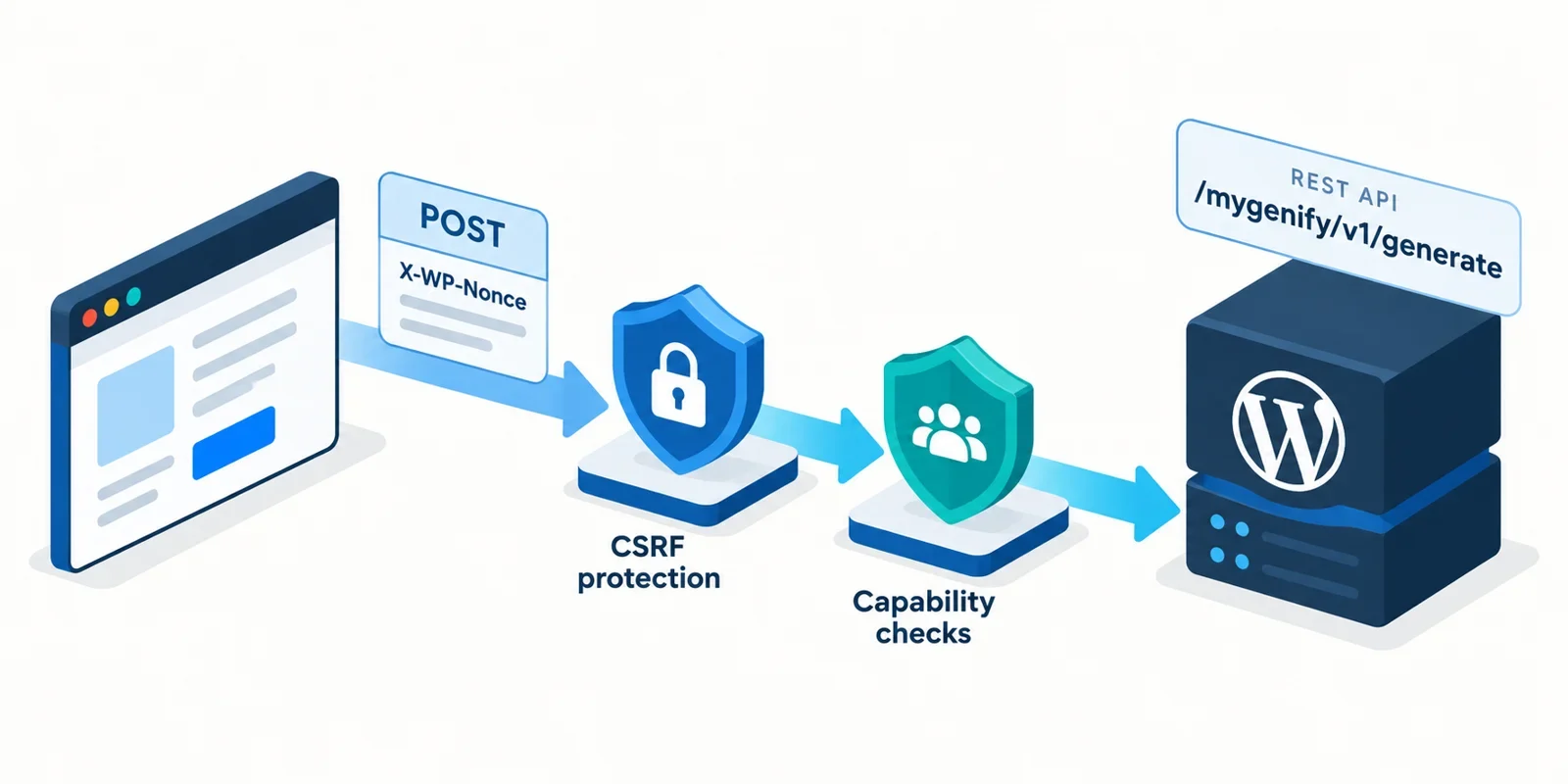
The cover illustration is an AI-generated diagram, not a location photo. It shows a browser request to a WordPress REST endpoint with two separate layers: a wp_rest nonce header for CSRF hygiene and a capability check for authorization. That distinction is the core of this architecture. For mygenify.cloud, the generator can be public and read-only, while favorites are a protected write path. The goal is a small custom plugin, a theme-owned template, curated name data in the admin, and a fast fetch-based UI that returns 10–20 result cards without a reload. Nonces do not prove who a user is; they help prove that a request came from a page your site intended to send it from. Authorization still belongs in permission callbacks and capability checks. The sections below cover data modeling, nonce creation and refresh, endpoint design, frontend behavior, copy/favorites, and the security mistakes that are easiest to make.
Request flow at a glance
Cover illustration: AI-generated illustration; not taken on location · Isometric diagram of a nonce-protected WordPress REST API request flow. Caption: AI-generated illustration; not taken on location · Nonce for CSRF hygiene, capability checks for authorization: two separate layers in one request.
The diagram can be read left to right. The browser loads a theme template, receives a localized REST URL and a wp_rest nonce, and sends a POST request with an X-WP-Nonce header. WordPress REST cookie validation checks the nonce when a logged-in cookie is present. The route’s permission_callback then decides whether the request may proceed. For public generation, that callback can allow anonymous access only because the endpoint is read-only, rate-limited, and returns public data. For favorites, the callback requires a logged-in user with the read capability. The response is JSON, and the frontend renders result cards without a page reload. Keep the diagram as the mental model: nonce first for CSRF hygiene, capability check second for authorization, validation and rate limiting around both.
Data model and admin management
Start with two data problems, not one. Curated names are editorial objects: a name, meaning, pronunciation, origin notes, and editorial status. Combinatorial banks are raw material: prefixes, roots, suffixes, first-name parts, last-name parts, and syllable patterns. Treat them differently.
For curated names, register a custom post type such as name_entry with taxonomies for theme, origin, gender, style, and syllable band. Store rarity, tags, pronunciation, and short notes in post meta. Use native meta boxes or ACF/SCF for admin editing, and use WP All Import or WP-CLI for bulk CSV/JSON imports. Keep the admin UI boring and predictable; the generator should not depend on a page builder.
For large word banks, do not create thousands of posts. Store versioned JSON files for small-to-medium banks, loaded once and cached with a transient or object cache. If the banks grow large or need filtering and indexing, use a custom table with columns for bank type, value, weight, locale, and status. Cache query results and invalidate the cache when imports finish. A practical rule: curated names in the CPT, combinatorial parts in JSON or an indexed table, and a single service class that assembles candidates so the REST route stays thin.
REST endpoint and nonce lifecycle
Register a read-only POST route at /wp-json/mygenify/v1/generate. Use POST because the request carries filter state and may be logged, not because it writes data. For a public generator, permission_callback can be __return_true only when the route is read-only, rate-limited, and returns public data. That is an explicit exception, not a default.
Create the nonce with wp_create_nonce('wp_rest') and localize it to the generator script. Send it as X-WP-Nonce. WordPress REST cookie validation uses that header when a logged-in cookie is present. The nonce is CSRF hygiene: it helps confirm the request came from a page your site intended. It is not authorization, and it does not identify a user.
Example enqueue/localize:
wp_enqueue_script('mygenify-generator', $url, [], $version, true);
wp_localize_script('mygenify-generator', 'MyGenify', [
  'restUrl' => esc_url_raw(rest_url('mygenify/v1/generate')),
  'nonce'   => wp_create_nonce('wp_rest'),
]);
In JavaScript:
fetch(MyGenify.restUrl, {
  method: 'POST',
  credentials: 'same-origin',
  headers: {
    'Content-Type': 'application/json',
    'X-WP-Nonce': MyGenify.nonce
  },
  body: JSON.stringify(filters)
});
Nonces expire. For long-lived sessions, do not assume the localized value lasts forever. Add a small authenticated nonce-refresh route or an admin-ajax action that returns a fresh wp_rest nonce, and call it when a request fails with rest_cookie_invalid_nonce. Also avoid full-page caching a stale nonce into HTML; fetch the nonce from an uncached request or refresh it client-side.
Instant frontend generator UX
Use vanilla JS and fetch with no page reload. The interaction should be: user chooses filters, clicks Generate, button enters a loading state, previous request is aborted if still running, new request is sent, and 10–20 result cards appear in a live region. Use AbortController for button-driven generation. Use debounce only for filter inputs that trigger requests automatically.
let controller;
async function generate(filters) {
  controller?.abort();
  controller = new AbortController();
  setLoading(true);
  try {
    const res = await fetch(MyGenify.restUrl, {
      method: 'POST',
      credentials: 'same-origin',
      signal: controller.signal,
      headers: {
        'Content-Type': 'application/json',
        'X-WP-Nonce': MyGenify.nonce
      },
      body: JSON.stringify(filters)
    });
    if (!res.ok) throw new Error('Generation failed');
    const data = await res.json();
    renderCards(data.results);
  } catch (err) {
    if (err.name !== 'AbortError') showError(err.message);
  } finally {
    setLoading(false);
  }
}
Render results as text nodes or escaped HTML. Do not inject server strings with innerHTML unless they are sanitized. Disable the button while loading, show a clear error with a retry action, and keep the previous results visible until the new batch arrives. Batch size matters: 10–20 cards is enough to feel useful without overwhelming the page. Add a “Generate more” action that appends a new batch rather than replacing the old one. Use aria-live='polite' for status messages and keep focus stable for keyboard users.
Copy, favorites, and retention
Copy should use the Clipboard API with a fallback for older browsers. Put a copy button on each result card and copy only the name, or name plus meaning if the card exposes that. For guests, store favorites in localStorage under a versioned key, cap the list, and validate the shape when reading it back. Treat localStorage as untrusted input: sanitize before rendering and never use it to authorize server actions.
For logged-in users, store favorites in user meta through a protected REST route such as /mygenify/v1/favorites. Require login, current_user_can('read'), and a valid nonce. Validate the favorite ID or payload, enforce a per-user cap, and return only the current user’s data. Do not expose a generic user-meta endpoint. If cross-device sync matters, the server-side route is the source of truth and localStorage becomes a cache for guests only.
Optional retention features: export favorites as JSON or CSV, create shareable URLs that encode filters but not private data, and provide a clear delete action. Keep anonymous generation ephemeral unless analytics is explicitly needed and disclosed. If you log results for quality review, store minimal fields, set a retention window, and avoid tying anonymous results to IP addresses longer than necessary. Copy and favorite actions are small features, but they are where CSRF, XSS, and privacy mistakes tend to appear.
Permission callbacks and capability checks
Separate public reads from sensitive writes. The generation endpoint is public and read-only. The favorites endpoint is a write and requires authentication and capability checks. The admin import or settings endpoints require manage_options or a custom capability. Do not use a nonce as a substitute for any of those checks.
A safe pattern:
register_rest_route('mygenify/v1', '/generate', [
  'methods'  => 'POST',
  'callback' => 'mygenify_generate',
  'permission_callback' => '__return_true', // only for public, read-only, rate-limited
]);

register_rest_route('mygenify/v1', '/favorites', [
  'methods'  => 'POST',
  'callback' => 'mygenify_save_favorite',
  'permission_callback' => function () {
    return is_user_logged_in() && current_user_can('read');
  },
]);
Inside callbacks, validate and sanitize parameters, check array shapes, and return WP_Error with proper status codes. Use current_user_can for object-level or role-level decisions. Use nonces for CSRF hygiene on state-changing requests. If you also use admin-ajax, call check_ajax_referer and then perform the capability check; the order does not turn the nonce into authorization. For public generation, rate limiting belongs in middleware, Cloudflare rules, Wordfence, or an application-level token bucket, not in the nonce.
Common security mistakes
Common mistake one: __return_true on a write endpoint. That exposes favorites, imports, or settings to unauthenticated writes. Mistake two: missing a nonce on logged-in AJAX. A logged-in browser can be tricked into sending a request from another site; the nonce is the CSRF guard. Mistake three: treating the nonce as authorization. A valid nonce does not mean the user may edit another user’s favorites or change settings. Mistake four: caching stale nonces. Full-page cache and CDN HTML can serve an expired nonce; refresh it or load it from an uncached endpoint. Mistake five: no rate limiting. A public generator is an easy target for scripted abuse; add per-IP and per-session limits, a cooldown, and a hard cap on batch size. Mistake six: rendering unsanitized result data. Treat names, meanings, and tags as text unless you deliberately allow markup. Mistake seven: using GET for state changes. Use POST for generation requests that carry filters and for all writes. Mistake eight: leaking internal banks or debug errors. Return generic errors to clients and log details server-side. Finally, test the failure paths: expired nonce, logged-out user, missing capability, oversized payload, and repeated requests.
Blue Studio reference mapping
Blue Studio’s public generator is a useful feature reference, not a design template. It publicly describes theme-based AI name generation, instant results, customization, free/no-signup access, and saved favorites/export. It also advertises 10–20 varied options per click. Use those as a baseline for mygenify.cloud: a theme selector, instant output, 10–20 result cards per batch, customization controls, and favorites/export. Do not copy its visual layout, copy, or interaction details; build your own theme template and component style.
Map the reference to your architecture: theme selection becomes a taxonomy filter; instant output becomes a fetch POST to /mygenify/v1/generate; 10–20 results becomes a batch size and a “Generate more” action; customization becomes sanitized filter parameters; favorites/export becomes localStorage for guests and a protected user-meta route for logged-in users. The reference is helpful for feature scope, but your security model must stand on its own: public read-only generation, protected writes, nonce hygiene, capability checks, and rate limiting.
Plugin and code suggestions
Put the logic in a small custom plugin, for example mygenify-core, and keep presentation in your theme template. The plugin should register the CPT, taxonomies, meta, REST routes, import commands, and cache invalidation. The theme should enqueue the generator script and render the form and result container. Use ACF/SCF if editors need structured fields quickly; use native meta boxes if you want fewer dependencies. Use WP All Import for CSV onboarding and WP-CLI commands for repeatable imports and cache warmups.
For performance, enable object cache if available, cache taxonomy queries and word-bank reads, and invalidate on import. For abuse control, start with Cloudflare or Wordfence rate limiting and add a simple application-level cooldown for anonymous generation. For testing, check the WordPress REST API handbook for current nonce and permission behavior, then write integration tests for public generation, expired nonce, logged-out favorites, logged-in favorites, and oversized payloads. A final checklist: generation is read-only; public permission is intentional; writes require login and capability; nonces are sent and refreshed; results are escaped; rate limits exist; and no private data appears in a public response.