Contents
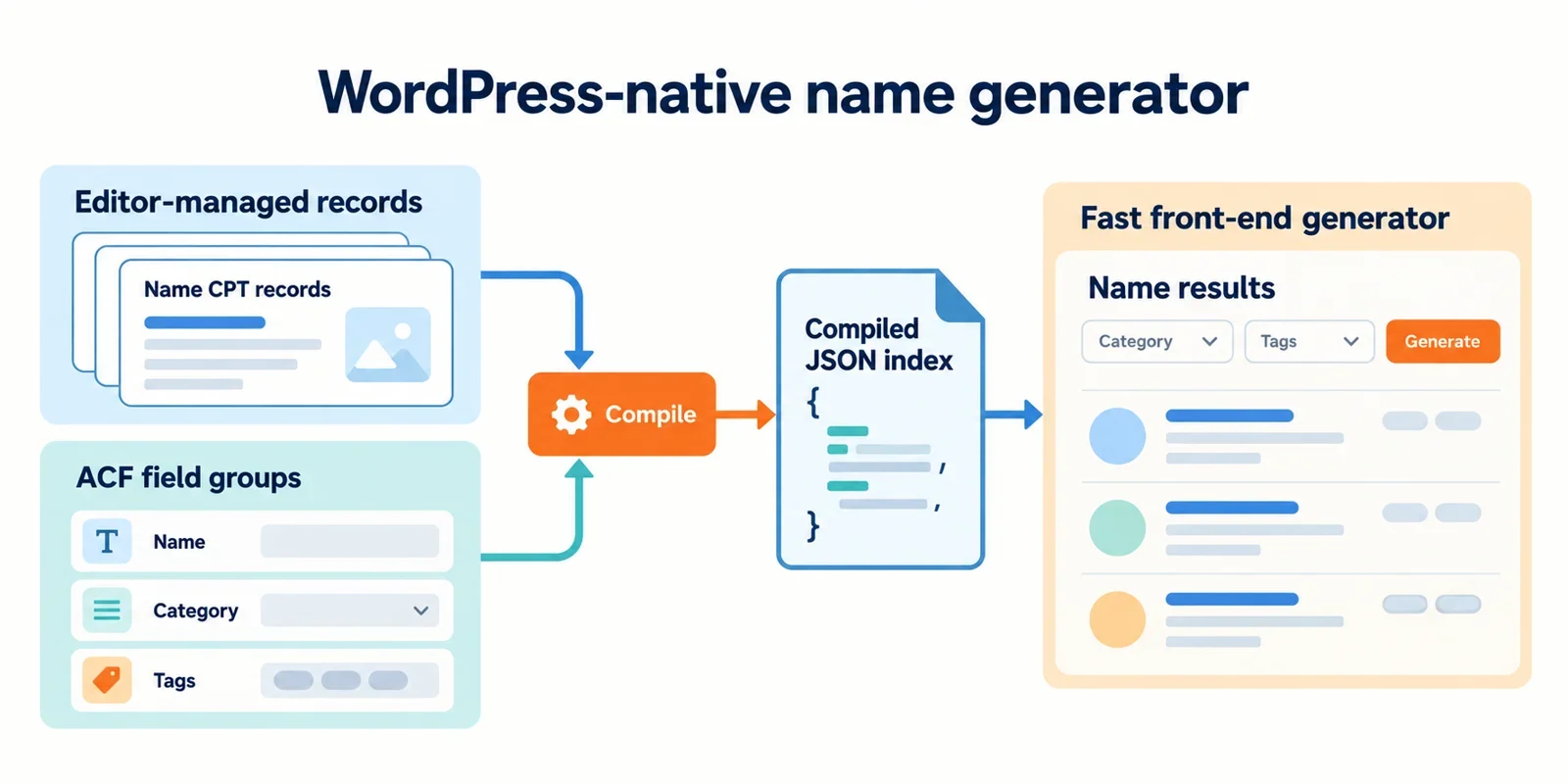
A name generator looks like a front-end trick and behaves like a content system. The hard part is not the button that says Generate; it is storing hundreds or thousands of curated names so editors can manage them, compiling them into something fast enough to answer a request in milliseconds, and letting editors launch new generator pages without a developer. This article lays out that architecture for mygenify.cloud using WordPress, two custom post types, and ACF PRO.
The model is deliberately boring: ng_name holds name records, ng_generator holds per-tool configuration, taxonomies hold the controlled filters, and ACF field groups hold the structured data. On save, records are flattened into a compact JSON index cached in a transient. The front end renders a server-side shell and calls a nonce-protected REST route, so generation feels instant without a page reload. The reference site informs the feature list, not the design.
Functional reference from bluestudio.cloud
Bluestudio.cloud is worth studying for its feature shape, not its interface. It presents a catalog of free name tools aimed at fantasy characters, RPG worlds, monsters, planets, usernames, nicknames, movie titles, and pirate ships, and the tools share a rhythm: pick a theme, optionally set preferences, then read a batch of results.
Patterns worth reproducing in mygenify:
- One page per generator. Each theme gets its own landing page with its own inputs, copy, and FAQ. In WordPress that maps to one
ng_generatorpost per tool, not a single overloaded page with twenty dropdowns. - Inputs before output. The letter-name generator exposes a style description and a starting-letter preference before producing anything. Model these as taxonomy and ACF filters, not free-text prompts, so results stay curated.
- Batch results. A run returns a list — plan for 10 to 20 names — plus a regenerate action that replaces the list rather than appending forever.
- Editable supporting copy. FAQ blocks, intro text, and disclaimers should be editable by content staff without touching templates.
- Save and export. The reference site mentions saving favorites and exporting lists for writing or team brainstorming. That is the retention hook worth copying.
- Free, no-signup, mobile-first. Guests get the full generator. Accounts are an optional enhancement, never a gate.
What to leave behind: AI branding as a hard dependency, and any chat-style interaction. Deterministic generation from curated records ships first. It costs nothing per request, returns in milliseconds, and is testable, which matters when editors start changing data.
Also treat privacy claims as a specification, not a slogan. Whatever the page says about data handling has to match what the server actually logs.
Content model: CPTs, taxonomies, and ACF field groups
Two post types, five taxonomies, two field groups. That is the whole model.
ng_name is the repeatable record: one row per curated name. The post title is the display name, the post slug is the URL-safe identifier, and ACF carries the structured extras — display name override, syllables or parts, pattern, tags, weight, rarity, status.
ng_generator is the tool: one row per public generator page. It stores which filters are enabled, the default result count, sort and randomization rules, button labels, and the disclaimer shown under results.
Taxonomies carry every controlled vocabulary: ng_theme, ng_origin, ng_style, ng_gender, ng_usage. Taxonomies are the right container for shared labels because editors get a familiar UI, terms can be reused across records, and queries can join on term IDs instead of scanning serialized meta.
A minimal registration pass:
add_action('init', function () {
    register_post_type('ng_name', [
        'label' => 'Names',
        'public' => false,
        'show_ui' => true,
        'show_in_rest' => true,
        'supports' => ['title', 'custom-fields'],
    ]);

    register_post_type('ng_generator', [
        'label' => 'Generators',
        'public' => true,
        'has_archive' => true,
        'show_in_rest' => true,
        'supports' => ['title', 'editor', 'thumbnail'],
        'rewrite' => ['slug' => 'generator'],
    ]);

    foreach (['ng_theme', 'ng_origin', 'ng_style', 'ng_gender', 'ng_usage'] as $tax) {
        register_taxonomy($tax, ['ng_name'], [
            'label' => ucfirst(str_replace('ng_', '', $tax)),
            'public' => false,
            'show_ui' => true,
            'show_in_rest' => true,
            'hierarchical' => false,
        ]);
    }
});
Keep name-record fields and generator-configuration fields in separate field groups. A field group should describe one content object or one tightly related editorial task; mixing a generator’s label settings with a name’s syllable rows creates a screen where every editor is confused by half the inputs.
Finally, treat field names as an API contract. Prefix them (ng_display_name, ng_weight, ng_rarity, ng_pattern) and never rename them after launch, because templates, REST responses, CSV importers, and any future migration all key off those strings.
Repeater design for name construction
Not every name needs composition logic. Some records are simply a finished string; others are assembled from parts so a small vocabulary produces a large, coherent output set. Support both, but keep the composition path shallow.
Two repeaters on ng_name, each capped:
ng_parts— rows of{type, value, syllables, weight}where type is prefix, root, or suffix. Cap at six rows. Two to four is typical.ng_patterns— rows of{pattern, weight, style}, where pattern is a token string such as{prefix}{root}{suffix}or{root}{suffix}. Cap at four rows.
Avoid nested repeaters. A repeater inside a repeater multiplies admin render cost and makes validation nearly impossible to explain to an editor.
At save time, flatten the structure into plain meta so runtime never walks the repeater:
function mygenify_compile_name($post_id) {
    if (get_post_type($post_id) !== 'ng_name') {
        return;
    }
    $parts   = get_field('ng_parts', $post_id) ?: [];
    $pattern = get_field('ng_pattern', $post_id);

    $display = '';
    foreach ($parts as $part) {
        $display .= isset($part['ng_value']) ? $part['ng_value'] : '';
    }
    if ($display === '') {
        $display = get_the_title($post_id);
    }

    update_post_meta($post_id, 'ng_compiled_display', $display);
    update_post_meta($post_id, 'ng_compiled_pattern', $pattern ?: '{root}');
    update_post_meta($post_id, 'ng_compiled_key', mygenify_normalize($display));
}
add_action('acf/save_post', 'mygenify_compile_name', 20);
mygenify_normalize() lowercases, strips diacritics and punctuation, and collapses whitespace. That normalized key becomes the duplicate-detection fingerprint and the sort key in the compiled index.
Pattern tokens should be documented in the field instructions with a worked example. Editors will otherwise invent tokens, and the generator will silently drop them.
Options page for editor-controlled generator configuration
The ACF PRO options page holds the settings that should be identical across every generator, plus the toggles that let you turn features off without a deploy.
Recommended global fields:
default_result_countandmax_result_countenabled_filters— a checkbox set covering theme, origin, style, gender, usage, starting letter, syllable count, raritydefault_sort— weighted random, alphabetical, rarity-first- UI labels: copy button, favorite button, regenerate button, empty-state message
disclaimer_text— the trademark and commercial-use noticerate_limit_message- Feature flags: favorites enabled, export enabled, guest-only mode, show FAQ block
Per-generator overrides live on ng_generator: which filters appear on that page, the default count, the restricted term pool, page-specific labels, and the short disclaimer variant.
Resolve settings with a single helper so precedence is never ambiguous in templates:
function mygenify_setting($key, $generator_id = 0, $fallback = null) {
    if ($generator_id) {
        $value = get_field($key, $generator_id);
        if ($value !== null && $value !== '' && $value !== []) {
            return $value;
        }
    }
    $global = get_field($key, 'option');
    return ($global !== null && $global !== '') ? $global : $fallback;
}
Generator field, then option, then hardcoded fallback. That order lets a single tool diverge without changing the site default, and it lets an editor kill a feature globally in one click.
Use Flexible Content for the editorial sections around the generator — intro blocks, FAQ accordions, related-tool cards — not for the name index itself. Landing-page layout is editorial; the name pool is data.
Compiled index and cache strategy
Querying repeater meta per request is the failure mode to design against. A meta_query against serialized repeater rows does not scale, and calling get_field() inside a loop produces an N+1 pattern that gets worse as the library grows.
Instead, compile once and read from memory:
function mygenify_build_index() {
    $ids = get_posts([
        'post_type' => 'ng_name',
        'post_status' => 'publish',
        'numberposts' => -1,
        'fields' => 'ids',
    ]);

    $index = ['version' => time(), 'names' => []];
    foreach ($ids as $id) {
        $index['names'][$id] = [
            'n' => get_post_meta($id, 'ng_compiled_display', true),
            't' => wp_get_post_terms($id, 'ng_theme', ['fields' => 'ids']),
            's' => wp_get_post_terms($id, 'ng_style', ['fields' => 'ids']),
            'g' => wp_get_post_terms($id, 'ng_gender', ['fields' => 'ids']),
            'w' => max(1, (int) get_post_meta($id, 'ng_weight', true)),
            'r' => get_post_meta($id, 'ng_rarity', true),
        ];
    }

    set_transient('mygenify_index', $index, WEEK_IN_SECONDS);
    return $index;
}
Short keys keep the payload small; a thousand records fits comfortably in a few hundred kilobytes. Store the same structure as a JSON file in uploads as a fallback so a cold object cache does not trigger a rebuild on a user request.
Invalidation: hook save_post_ng_name, acf/save_post, and term changes to set a mygenify_index_dirty flag rather than rebuilding inline. Rebuild on shutdown or via a scheduled event, so a bulk import of 500 names triggers one compile instead of 500.
When to move to custom tables: if the compiled JSON exceeds a few megabytes, if filtering needs to happen server-side across many attributes at once, or if editors change records continuously. Until then, the transient plus file fallback is simpler and debuggable.
Instant front-end generation via REST/AJAX
Render the shell server-side and let JavaScript do the small work.
The template outputs the generator wrapper with a data attribute, the localized endpoint, a REST nonce, and the current generator slug. Everything below that is progressive enhancement: without JavaScript, the page still shows the tool’s intro, FAQ, and disclaimer.
wp_localize_script('mygenify-app', 'Mygenify', [
    'endpoint' => esc_url_raw(rest_url('mygenify/v1/generate')),
    'nonce'    => wp_create_nonce('wp_rest'),
    'generator' => get_post_field('post_name', get_the_ID()),
]);
The route:
add_action('rest_api_init', function () {
    register_rest_route('mygenify/v1', '/generate', [
        'methods'  => 'POST',
        'callback' => 'mygenify_rest_generate',
        'permission_callback' => '__return_true',
    ]);
});

function mygenify_rest_generate(WP_REST_Request $req) {
    if (!wp_verify_nonce($req->get_header('X-WP-Nonce'), 'wp_rest')) {
        return new WP_Error('bad_nonce', 'Session expired', ['status' => 403]);
    }

    $ip  = isset($_SERVER['REMOTE_ADDR']) ? sanitize_text_field($_SERVER['REMOTE_ADDR']) : '';
    $key = 'mgn_rl_' . md5($ip);
    $hits = (int) get_transient($key);
    if ($hits > 40) {
        return new WP_Error('rate_limited', 'Slow down', ['status' => 429]);
    }
    set_transient($key, $hits + 1, MINUTE_IN_SECONDS);

    $args = [
        'generator' => sanitize_key($req['generator']),
        'letter'    => sanitize_text_field($req['letter'] ?? ''),
        'count'     => min(20, max(1, (int) ($req['count'] ?? 12))),
    ];

    // Filter the compiled index by term IDs, then weighted-sample.
    return rest_ensure_response(['names' => mygenify_pick($args)]);
}
The callback reads the transient index, filters by the generator’s enabled filters and requested term IDs, then samples without replacement using the stored weight. Randomization belongs on the server: it keeps the pool authoritative, keeps duplicates out of a single run, and means the client never downloads the whole library.
On the client, debounce the controls, cancel in-flight requests, and update the DOM in one pass:
async function generate(payload, signal) {
  const res = await fetch(Mygenify.endpoint, {
    method: 'POST',
    signal,
    headers: { 'Content-Type': 'application/json', 'X-WP-Nonce': Mygenify.nonce },
    body: JSON.stringify(payload)
  });
  if (!res.ok) throw new Error('request failed');
  return res.json();
}
Return JSON, not rendered HTML. JSON keeps the response cacheable, reusable by a future app or export tool, and small. Render cards client-side from a single template function so the markup stays consistent. Put results in an aria-live="polite" region and move focus to the list heading after generation so keyboard and screen-reader users are not stranded.
Copy and favorites retention
These two interactions are where a utility site becomes a tool someone returns to.
Copy. Use the Clipboard API with a fallback, and always confirm visually:
async function copyText(text) {
  try {
    await navigator.clipboard.writeText(text);
  } catch (err) {
    const ta = document.createElement('textarea');
    ta.value = text;
    ta.setAttribute('readonly', '');
    ta.style.position = 'fixed';
    ta.style.opacity = '0';
    document.body.appendChild(ta);
    ta.select();
    document.execCommand('copy');
    ta.remove();
  }
  flash('Copied');
}
The fallback matters because Clipboard API access requires a secure context and a user gesture; it fails in older Safari and inside some in-app browsers. Fire the copy from a click handler, never on load.
Favorites. Start guest-only. Key localStorage by generator so a fantasy shortlist does not collide with a pirate-ship shortlist:
const key = 'mygenify:favs:' + Mygenify.generator;
const list = JSON.parse(localStorage.getItem(key) || '[]');
Store objects with the name and a timestamp, cap the list at a few hundred entries, and guard every read with a try/catch because private browsing modes and storage quotas both throw. Render a count badge next to the button so state is visible without opening a panel.
Add user meta sync later, not now. When you do, mirror the same shape into mygenify_favorites user meta through an authenticated REST route, and merge guest favorites into the account on first login rather than overwriting. Export — plain text or CSV generated client-side from a Blob — is a cheap follow-up that matches the reference site’s save-and-export pattern and gives the feature a reason to exist beyond a single session.
Editor workflow and validation
The generator is only as good as the data entry experience behind it. Most failures are boring: an empty pattern, a duplicate slug, a name with no theme term, a pattern referencing a token that does not exist.
Field-level defenses:
- Field instructions with a worked example for every pattern token.
- Required flags on display name, at least one theme term, and status.
- Conditional logic: show the pattern field only when composition is set to pattern-based; show the rarity field only when status is published.
- A read-only computed field showing the compiled display string, so the editor sees exactly what the generator will output.
Server-side defenses with acf/validate_value:
- Reject empty display names and names whose compiled key already exists on another published record.
- Reject patterns containing tokens not present in the parts repeater.
- Reject records with zero theme terms.
- Cap the parts repeater at save time as well as in the UI.
Duplicate detection deserves two tiers. On save, compare the normalized key against an indexed meta lookup — cheap and exact. Near-duplicates, such as variants one letter apart, should be caught by a periodic audit tool that runs levenshtein or similar_text across the compiled keys and lists suspicious pairs for a human to merge. Do not run fuzzy matching on every save; it turns a fast publish into a slow one.
Finally, give editors a preview. A metabox on ng_generator that runs the current configuration against the compiled index and prints ten sample names — with the active filters listed above them — catches configuration mistakes before a page goes live. If you want a shortcut for scaffolding new field groups during prototyping, an AI field generator can draft the structure, but the runtime must stay deterministic and driven by the compiled index.
Performance and scale guardrails
Set the limits before the library grows, not after.
- Cap repeaters. Six parts rows, four pattern rows. Enforce in the field settings and again on save.
- Paginate admin lists. Fifty records per screen on
ng_name. Editors scrolling a thousand rows stop editing. - Index what you query. Term relationships and the normalized key are the two lookups that matter; both should be indexed or precomputed.
- Never call
get_field()in a loop. Read compiled post meta in bulk withupdate_meta_cache(), or read the compiled index directly. - Compile in batches. A bulk import should set a dirty flag and trigger one rebuild, not one per post.
- Invalidate on
save_post,acf/save_post, term edits, and post deletion. A stale index is worse than a slow one because it silently serves deleted names. - Cache the response path. The REST response is intentionally uncacheable per user, but the index read should come from the object cache; verify with Query Monitor that a generation request issues zero database queries for name data on a warm cache.
Measure before optimizing further. If the compiled index is under a megabyte and rebuilds in under a second, the architecture is fine and the next bottleneck is front-end rendering, not data. If generation requests start taking hundreds of milliseconds, check index size and rebuild frequency first, and only then consider custom tables.
Privacy, legal, and measurement
Two obligations, both easy to get wrong.
Disclose what actually happens. A rate limiter hashes and stores an IP-derived key for a minute. The web server writes access logs that include IP addresses and user agents, and those logs have a retention period set by the host. If analytics are installed, they collect more. The privacy page should state each of these plainly, with retention windows and a contact route for deletion requests. Do not print "we track nothing" unless that is literally true; a single default plugin install usually makes it false.
Disclaim the output. Names produced by a curated generator are editorial suggestions. They are not trademark clearance, not a commercial-use guarantee, and not legal advice. Put that sentence under the results, editable from the options page, and link to a fuller disclaimer page. A reader who lifts a generated name for a product still has to run their own search.
Measurement, when you add it:
- Log generation, copy, and favorite events only after consent where consent is required.
- Prefer aggregate counts over per-user trails; you need to know which generators and filters people use, not who used them.
- Keep generated result states out of the index. The generator landing pages should be indexable with stable titles and descriptions; the result list is client-rendered and should not generate crawlable URL variants.
- Set canonical URLs on generator pages and avoid parameterized result URLs entirely — a
?letter=Svariant has no SEO value and creates duplicate-content noise.
Launch decisions and build order
Lock these before writing templates, because each one changes the data model or the endpoint contract.
- Mandatory launch filters: theme, starting letter, and gender. Origin, style, usage, syllable count, and rarity ship as optional filters enabled per generator.
- Storage: both. Full records are the source of truth; components exist inside the parts repeater and are compiled into the record, not stored as separate posts.
- Settings split: per-generator for anything a single tool can differ on (enabled filters, default count, labels, disclaimer variant, term pool). Global options for defaults, feature flags, rate-limit copy, and the master disclaimer.
- Result count: 12 by default, 20 maximum, server-side weighted random sampling without replacement.
- Response format: JSON, rendered client-side from one template function.
- Duplicates: exact match on the normalized key at save; near-duplicates through a periodic audit report, not inline.
- Favorites: localStorage only at launch, keyed per generator, with user meta sync designed but not shipped.
- Clipboard fallback: hidden textarea plus
execCommand('copy')for non-secure contexts and older browsers. - Index invalidation: dirty flag on
save_post,acf/save_post, term changes, and deletions; rebuild on shutdown or cron. - Privacy disclosure: written from the actual host logs, plugin list, and analytics configuration, with retention windows.
- Legal copy: editorial-suggestion disclaimer under results, fuller page linked.
- Out of scope for v1: AI model calls, accounts, export, multi-language name sets, and user-submitted names.
Build order that avoids rework: register CPTs and taxonomies, then the ACF field groups, then the compile-on-save step, then the index builder, then the REST route, then the shell template and JS, then copy and favorites, then validation and the admin preview. Each step is testable on its own, and the compiled index means the front end can be built against stable data before the design is finished.