On this page
The experience goal is simple: a visitor chooses filters, presses Generate, and sees a fresh list immediately, without a page reload or an account. Blue Studio’s public tools illustrate that model—instant output, free access, no sign-up—and this guide focuses on the WordPress architecture behind it rather than copying any visual design. You will see how to store lexicons, design an endpoint that serves both guests and logged-in users, validate requests, format responses, render results accessibly, and add small retention utilities without turning the site into a heavy application.
Data Storage Architectures for Name Lexicons
Choose storage based on filters and scale
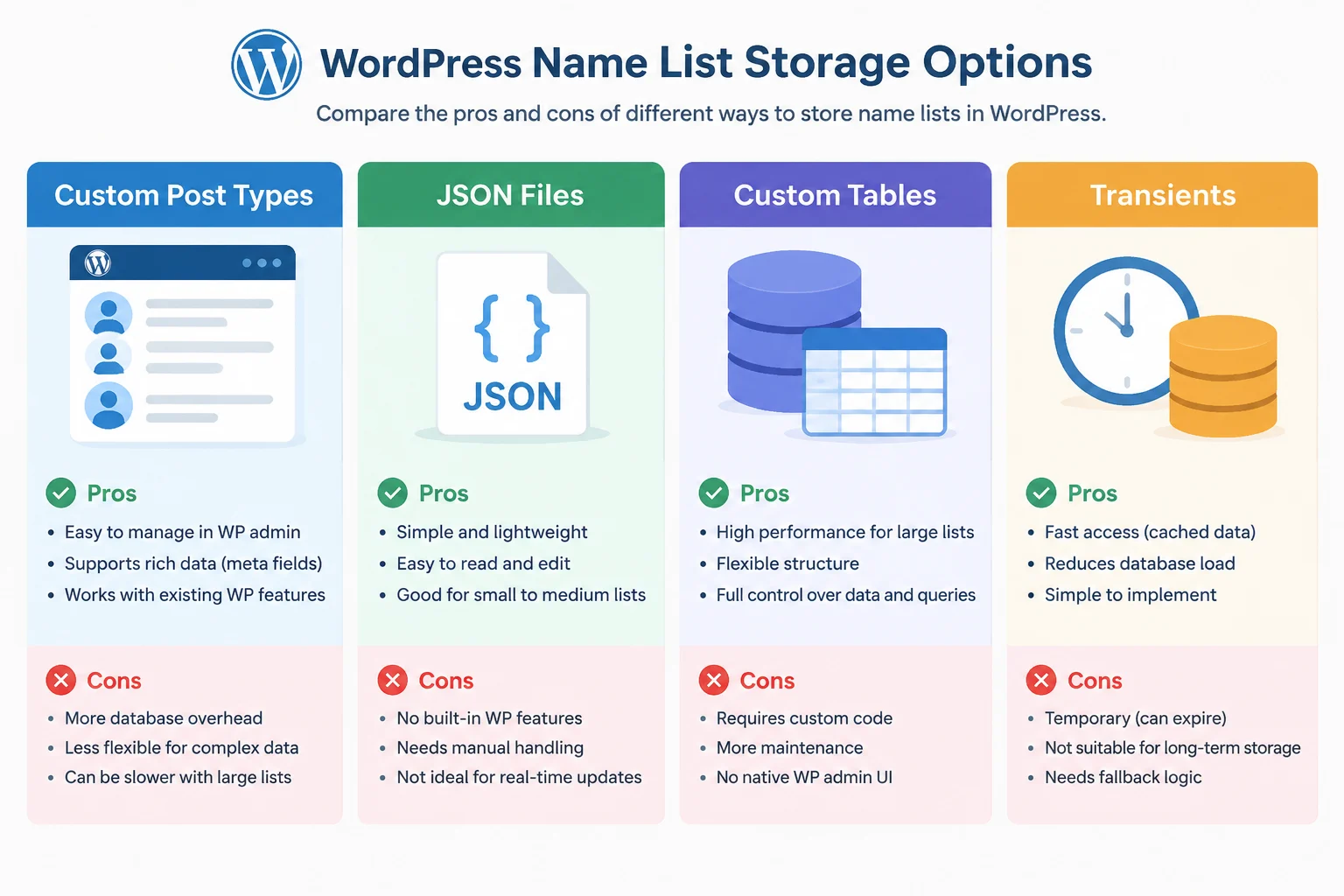
A name generator is read-heavy: visitors request small result sets, while editors occasionally import or edit lexicons. Start with the filters you need—theme, origin, gender, length, first letter, syllable count—and choose the simplest storage that can answer those filters quickly.
| Option | Best for | Watch-outs |
|---|---|---|
| Custom post type plus taxonomies | Editorial workflows, revisions, familiar admin UI | Meta queries for numeric filters can become slow; taxonomy terms are awkward for every possible length or syllable count |
| Custom database table | Large lexicons, predictable filtering, 10,000+ rows | You own schema migrations, indexes, and import tooling |
| JSON files | Read-only seed data, versioned datasets, small projects | Reading and decoding a file on every AJAX request wastes I/O; import it into a queryable store first |
| Transients or object cache | Cached random pools, filter counts, repeated queries | Cache invalidation must be deliberate; not a primary storage layer |
For a small lexicon, a custom post type with a taxonomy for theme and post meta for length is easy for editors and works with WP_Query. For a large or filter-heavy corpus, a dedicated table is often more predictable. A practical schema might include id, name, theme, origin, gender, length, syllables, first_letter, active, and created_at, with indexes on the columns used in WHERE clauses. Select only the columns you need, and always use prepared statements.
Admin usability and imports
Editors should not edit rows in a database console. Provide an admin screen or a CSV importer with a dry run, duplicate detection, and batch processing. CSV is friendly for content operators; JSON is useful for versioned seed data. Validate both, stage imports, and make the process idempotent so a retry does not create duplicates. For 10,000+ entries on shared hosting, import in batches rather than one request per row.
Caching without stale results
Use transients for expensive repeated work: a shuffled pool for a popular filter, a count of active names, or the first page of a common query. Version the cache key and invalidate it when an editor saves or imports data. If a persistent object cache is available, use it; otherwise keep transients short-lived and avoid caching personalized or rate-limit data for too long. The goal is to reduce database load without making new names invisible.
WordPress AJAX Endpoint Design and Request Lifecycle
The request lifecycle
All WordPress AJAX requests are routed through wp-admin/admin-ajax.php. In a front-end context, pass that URL to JavaScript through wp_localize_script() rather than hard-coding it. The same localized object can carry a nonce and the action name.
add_action( 'wp_ajax_mygen_generate', 'mygen_generate' );
add_action( 'wp_ajax_nopriv_mygen_generate', 'mygen_generate' );

function mygen_generate() {
    check_ajax_referer( 'mygen_generate', 'nonce' );
    $theme = isset( $_POST['theme'] ) ? sanitize_key( wp_unslash( $_POST['theme'] ) ) : '';
    $count = isset( $_POST['count'] ) ? min( 20, absint( $_POST['count'] ) ) : 5;
    // Query and return results.
    wp_send_json_success( array( 'items' => $items ) );
}
Register both wp_ajax_ and wp_ajax_nopriv_ when guests may generate names. The callback should return only public fields: an ID, a display name, and optional filter metadata. Never return internal notes, private taxonomy data, or user-specific information. For logged-in users, capability checks belong only on actions that change data; generation can remain public if it is rate-limited.
Client-side call and response shape
async function generateNames(filters, signal) {
  const body = new URLSearchParams({ action: 'mygen_generate', nonce: MyGenConfig.nonce, ...filters });
  const response = await fetch(MyGenConfig.ajaxUrl, { method: 'POST', body, signal });
  const payload = await response.json();
  if (!payload.success) throw new Error(payload.data.message);
  return payload.data.items;
}
Use WordPress’s standard response envelope. On success, return a data object with an items array, a request_id for debugging, and optional remaining quota. Each item should have a stable id, a name, and a small meta object. On failure, return a data object with a machine-readable code, a user-safe message, and retry_after when rate limiting applies. wp_send_json_success() and wp_send_json_error() handle the envelope and HTTP status.
admin-ajax or REST?
admin-ajax.php is familiar and works for small and medium sites. A REST route can be cleaner for versioned APIs, but it adds route registration and permission-callback decisions. For a first implementation, a single admin-ajax action with a strict response schema is enough. If traffic grows, move the same handler logic behind a REST controller or a custom lightweight endpoint and keep the response shape stable.
Security and Nonce Verification for AJAX Generators
Nonces are CSRF protection, not authentication
Use check_ajax_referer() on every state-changing or expensive AJAX action. For public generation, the nonce still raises the cost of casual abuse and ties the request to a session. Do not treat a valid nonce as proof that the user is allowed to do anything; pair it with capability checks for admin actions and with rate limiting for public actions.
check_ajax_referer( 'mygen_generate', 'nonce' );
$raw = isset( $_POST['name'] ) ? wp_unslash( $_POST['name'] ) : '';
$name = sanitize_text_field( $raw );
Sanitize early, validate against an allowlist for filters, and cast numbers with absint(). Avoid passing raw POST data into SQL or into HTML. Escape on output as well.
Long sessions and nonce refresh
WordPress nonces are time-limited. For a generator that may stay open in a tab for hours, do not store a nonce in localStorage and assume it is permanent. Load a fresh nonce with the page, and if the endpoint returns a nonce_expired error, fetch a new nonce from a small refresh action and retry once. This keeps CSRF protection without forcing a page reload.
Rate limiting for guests and members
Rate limiting is the main control for public generation. Key it by a hashed IP for guests and by user ID for members, plus the action name. Store counters in a transient, object cache, or custom table depending on traffic. Return HTTP 429 with a retry_after value, and make the frontend show a calm message rather than a silent failure.
$key = 'mygen_rl_' . md5( $ip . '|mygen_generate' );
$hits = (int) get_transient( $key );
if ( $hits >= 30 ) {
    wp_send_json_error( array( 'code' => 'rate_limited', 'message' => 'Please wait a moment.' ), 429 );
}
set_transient( $key, $hits + 1, MINUTE_IN_SECONDS );
Be careful with proxy headers; only trust forwarded IPs when your host or CDN is configured correctly. Also cap result counts, reject unknown filter values, and avoid endpoints that can dump the entire lexicon.
Frontend Instant-Feedback Patterns: JS/jQuery and Rendering
Fire requests from clear user actions
Bind generation to a form submit or button click, and use preventDefault() so the page does not reload. If filters change automatically, debounce them. Keep the request small: send only the selected filters, a count, and an exclusion list, not the whole state of the page.
Loading, cancellation, and stale responses
Show a loading state immediately: disable the button, set aria-busy on the results region, and keep the previous results visible until new ones arrive. Use AbortController to cancel an in-flight request when the user changes filters again. Ignore any response that belongs to an older request id.
Rendering and deduplication
Render with DOM methods and textContent for names; do not inject user-controlled strings with innerHTML. Keep a Set of IDs already shown in the session and send them as exclude_ids. On the server, filter those IDs before selecting random rows. For large tables, avoid ORDER BY RAND(); use a precomputed random bucket, a shuffled cache, or select a random offset and wrap around. This keeps repeated generations fast and reduces duplicate names.
Accessibility
Use an aria-live region set to polite for the result count and a labelled list for names. Move focus only when the interaction requires it; do not steal focus on every generation. Announce short updates such as ‘5 names generated’ and ensure copy buttons have accessible names. Provide a no-JavaScript fallback form that submits to a normal page or returns a basic list, so the generator remains usable if scripts fail.
Retention Features: Copy-to-Clipboard and Favorites/Staging
Copy-to-clipboard
Use the Clipboard API when available, but keep a fallback for older browsers and mobile Safari variants. The copy must happen inside a user gesture, and the UI should confirm success without a modal.
async function copyText(text) {
  try {
    await navigator.clipboard.writeText(text);
    return true;
  } catch (error) {
    const area = document.createElement('textarea');
    area.value = text;
    area.setAttribute('readonly', '');
    area.style.position = 'fixed';
    area.style.opacity = '0';
    document.body.appendChild(area);
    area.select();
    const ok = document.execCommand('copy');
    document.body.removeChild(area);
    return ok;
  }
}
Favorites and staging with localStorage
For guests, localStorage is enough for a lightweight favorites list. Store a small object per item: id, name, and timestamp. Cap the list, version the key, and provide a clear button. Do not store the entire lexicon or sensitive data. Synchronize to the server only when a user explicitly asks.
const KEY = 'mygen_favorites_v1';
function getFavorites() {
  return JSON.parse(localStorage.getItem(KEY) || '[]');
}
For logged-in users who need cross-device favorites, avoid unbounded user meta arrays. A custom table with user_id, item_id, created_at, and a unique key on user_id plus item_id is easier to query and prune. Add a retention limit and a delete endpoint protected by a nonce and capability check.
Practical Plugin Examples and Reference Implementations
What existing plugins teach
Orbisius Random Name Generator is a useful reference for simple random selection and admin-managed lists. Before adopting it, check current maintenance, whether it exposes filtered AJAX endpoints, and whether it includes nonce checks, rate limiting, and caching. Name Directory is a shortcode-driven directory plugin: it embeds a directory through a shortcode such as [namedirectory dir=1], where 1 is the internal directory ID. That pattern is convenient for structured entries, but a fast filtered generator may still need custom query and response logic.
Use Blue Studio as a feature checklist, not a template
Blue Studio’s public tools show the experience target: instant generation, free access, no account barrier, and lightweight retention. Translate that into requirements: a one-click generate action, visible loading feedback, copy and favorite controls, and no mandatory login. Keep your own templates, typography, and component design separate from the implementation pattern.
Recommended build path
For a focused utility site, a small custom plugin is usually the cleanest path: a custom table or CPT for lexicons, an admin importer, one AJAX action with a stable response schema, a frontend script localized with the endpoint URL and nonce, and localStorage-backed favorites. Use existing plugins for inspiration or for a quick MVP, but verify their security and performance characteristics against your own requirements. For current API details, consult the official WordPress developer documentation for wp_localize_script, check_ajax_referer, wp_send_json_success, and wpdb.