On this page
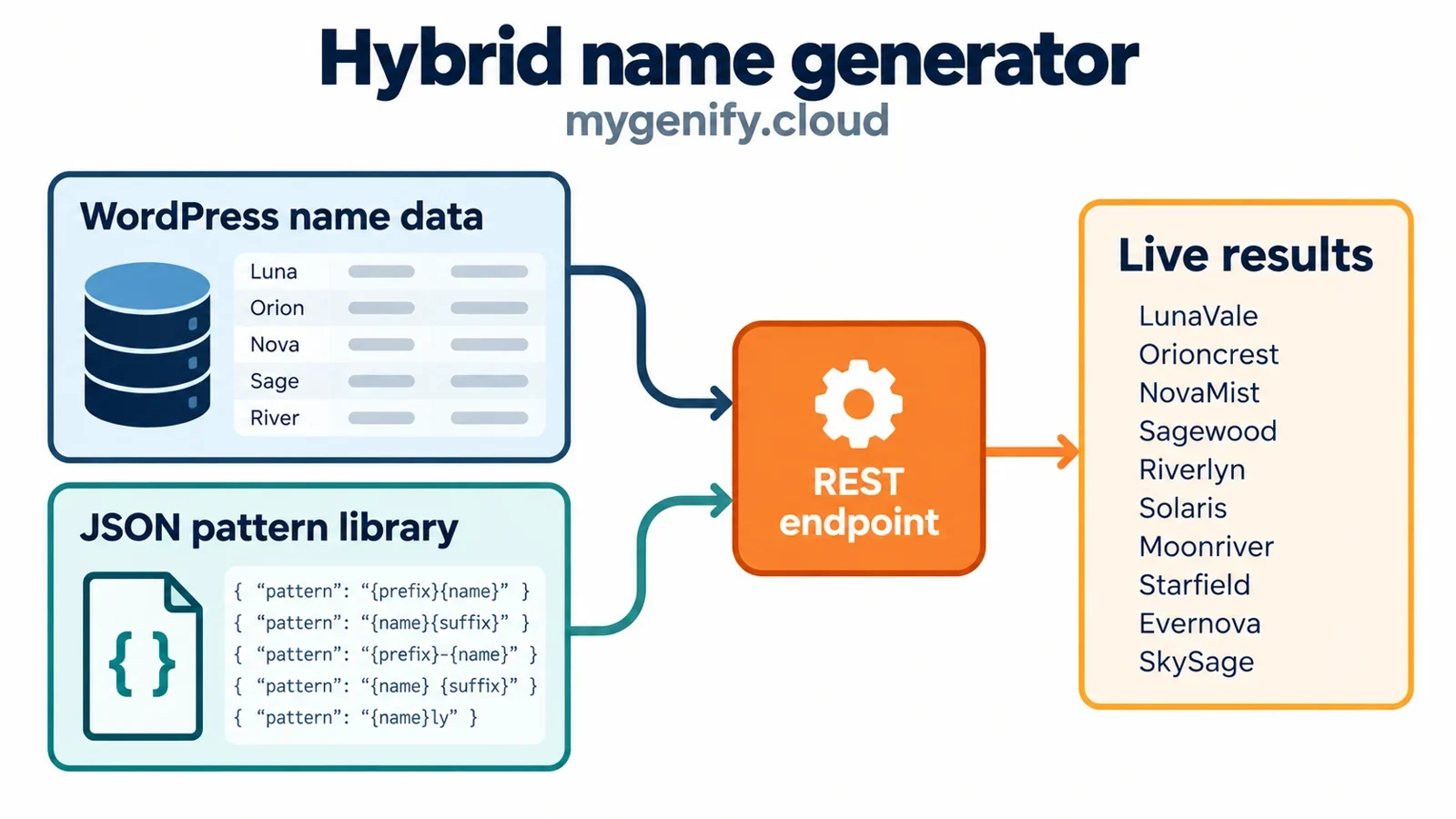
A name generator feels instant only when the data model, endpoint, and frontend agree on the same contract. The practical build for mygenify.cloud is a hybrid: curated name entries in WordPress for editorial control, a compact JSON or pattern library for fast generation, and a public REST endpoint that accepts filters plus a seed. The frontend calls that endpoint with fetch, renders results in an ARIA live region, shows loading, empty, and error states, and keeps URL state so a list can be shared. Copy buttons use the Clipboard API with a fallback; favorites start in localStorage and can sync to user meta later. A no-JS form posts to the same endpoint or a server-rendered results page. Blue Studio is named in the brief as a reference site, but the verified fact set here does not support specific claims about its theme count, pricing, signup requirements, regeneration, favorites, or export; audit those directly before publishing them. Domain checks should stay optional and clearly non-reserving.
WordPress Data Model for Name Libraries
Treat the data layer as two libraries with different jobs. Curated names belong in WordPress because editors need previews, revisions, categories, and publishing controls. Register a mg_name custom post type with show_in_rest, a short title field, and post meta for syllables, character length, style notes, and a normalized key. Use taxonomies for mg_style, mg_origin, mg_audience, and mg_tone; taxonomies are cheaper to filter than arbitrary meta. Keep the generated-output layer separate: a JSON pattern library of prefixes, suffixes, roots, syllable templates, and weights stored as a versioned file in the plugin, loaded once and cached. Do not create a post for every generated combination.
Tradeoffs: CPT plus taxonomies is best for editorial control and moderate libraries. A custom table wins when you have hundreds of thousands of rows and need compound indexes, but it adds migration and admin UI work. JSON is excellent for immutable pattern data and client-side instant previews, but poor for editorial review. A practical hybrid is CPT for curated entries, JSON for generation atoms, and a custom read table only if query profiling proves the CPT meta queries are the bottleneck. Use WP-CLI or a CSV importer for bulk loads, and store a normalized name_key to enforce duplicates.
Generation Endpoint and Query Contract
Expose one public read endpoint: GET /wp-json/mygenify/v1/names. Contract: style[], origin[], starts_with, length_min, length_max, seed, page, per_page, and q. Whitelist taxonomy slugs against get_terms(), sanitize text with sanitize_text_field(), cast numbers with absint(), clamp per_page to 24 or 48, and accept a seed of 1 to 32 alphanumeric characters. Return items[], total, seed, page, next_page, and the normalized filters. Do not return raw post objects; map to a small DTO.
Nonces are not authentication for public GET reads. Use a nonce only on write operations such as syncing favorites to user meta. For abuse control, apply a per-IP token bucket in object cache or at the edge, and cache successful responses by a normalized key of filters, seed, and page. Send Cache-Control: public, max-age=300, s-maxage=600 and avoid setting cookies on this route. If you need logged-in personalization, use a separate route. For no-JS, the same contract can power a server-rendered results page.
register_rest_route('mygenify/v1', '/names', [
  'methods' => 'GET',
  'callback' => 'mg_names_endpoint',
  'permission_callback' => '__return_true',
]);
The callback should normalize input once, build a cache key, and return WP_REST_Response with an explicit status. Keep validation and generation in separate functions so the no-JS page can call the same service.
Instant Frontend Fetch Flow
On submit, prevent the default form post, build URLSearchParams from FormData, and call fetch() with an AbortController. Abort the previous request when filters change or the user presses Generate again. Keep the results container at a stable minimum height, set aria-busy='true', disable the submit button, and show a status message such as ‘Generating names…’. Do not replace the whole page with a spinner.
Render each result as a list item with a name, metadata chips, Copy, and Favorite buttons. Use textContent or a tiny templating function that escapes values; never inject API strings with innerHTML. Handle response.ok, JSON parse failures, timeouts, empty arrays, and network errors with distinct messages. On success, update the URL with history.replaceState() for filter changes and pushState() for explicit Generate actions so Back works. Keep the form usable while results load.
const ctrl = new AbortController();
fetch('/wp-json/mygenify/v1/names?' + params, {
  signal: ctrl.signal,
  headers: { Accept: 'application/json' }
});
If a request is aborted, do not show an error. Show the empty state only after a successful response with zero items, and give the user a clear next step such as removing a filter or trying a new seed.
Deterministic Results and Shareable State
Seeded output is the difference between a toy and a shareable tool. Normalize filters into a canonical string, hash it with a small stable hash, and combine it with the user seed to drive a PRNG such as mulberry32. Shuffle a candidate array with that PRNG, then slice the requested page. The same filters, seed, and page must produce the same names in the same order on the server and in the browser. If you cannot keep two implementations in sync, make the server authoritative and use client-side generation only for a cached preview.
Put seed, filters, and page in the query string. A ‘New names’ button should generate a new seed and push a new history entry. Share links should include the seed. Canonicalize parameter order and drop defaults so the URL stays short. Cache responses by the canonical key, not the raw query string. For pagination, return a next_page token or page number; never rely on a random re-shuffle between requests. This also makes support and editorial QA easier: a bug report can include a URL that reproduces the exact list.
Copy, Favorites, and Retention Features
Copy should use navigator.clipboard.writeText() when available and fall back to a hidden textarea plus document.execCommand('copy') for older browsers. Announce success or failure in a polite live region, and keep the button label stable; do not rely on a color change alone. Use aria-pressed for favorites and a clear ‘Added to favorites’ status.
Favorites should work without an account. Store an array of normalized name keys plus display data in localStorage under a versioned key such as mygenify:favorites:v1. Handle blocked storage by falling back to an in-memory list for the session and telling the user. Provide Export as JSON or CSV. If you later add accounts, sync through a separate authenticated REST route with a nonce, merge by name_key and updated_at, and never block the local-first flow on login. A Favorites drawer or page can render from localStorage instantly.
Accessibility and Graceful Fallbacks
Accessibility is mostly about not surprising the user. Put a single role='status' aria-live='polite' region near the results heading for counts and errors. Do not make the entire result list a live region; that can read dozens of names. After a user-initiated Generate, move focus to the results heading with tabindex='-1' so keyboard and screen-reader users land in the new content. Do not move focus on every filter change.
Use a real <form> with a submit button, visible labels, fieldset and legend for checkbox groups, and aria-describedby for helper text. The loading state should set aria-busy on the results container and keep the previous results visible or show a stable skeleton. For no-JS, the form should GET to a server-rendered results URL that runs the same query and renders paginated links. That page also gives crawlers and social previews something to read. Add a <noscript> note and make sure the endpoint returns a helpful HTML error page, not a JSON blob, when the request accepts HTML.
Safety, Duplicates, and Domain Checks
Run every candidate through a validation pipeline before rendering: trim, collapse whitespace, enforce a maximum length of 60 characters, normalize for duplicate detection, and reject entries that match a maintained block list of slurs and offensive terms. All the Names validates every result for duplicates, a 60-character maximum, and a block list of slurs and offensive words; treat that as a baseline. Keep the block list in versioned configuration, not in a database row that can be edited accidentally. Deduplicate after normalization so ‘Blue Studio’ and ‘bluestudio’ do not both appear.
Domain checks should be optional. All the Names’ Check .com button converts a name to a domain and queries Verisign RDAP from the browser; the result is explicitly not a reservation and says nothing about trademarks. A server-side proxy can do the same with caching and rate limits. Label it plainly: ‘Availability signal only. Not a reservation. Not trademark or legal advice.’ Do not check every result automatically, do not imply the domain is secured, and do not present RDAP output as a guarantee. Rate-limit the proxy and log failures without storing user queries longer than needed.
Reference Patterns from Blue Studio and Comparable Generators
Blue Studio is named in the project brief as a reference site, but the verified fact set available for this draft does not support specific claims about its theme count, pricing, signup requirements, regeneration, favorites, or export. Do not publish those as facts without a dated manual audit. The defensible pattern is procedural: inspect the live flow, record which controls exist, and map only verified behaviors to your own components. Keep the visual layer entirely yours; do not copy layout, typography, color, or interaction styling. If style coverage matters, count your own published styles and show that number instead of borrowing an unverified reference claim.
The comparable generators covered by the fact set show concrete behaviors worth adapting. Wix’s generator supports editing keywords and industry, then refreshing the list with Generate New Names, which is a good model for keeping controls close to results. All the Names says its generators are not AI models; they use hand-written word lists and weighted patterns that run in the browser. It only offers first-letter choices that can produce results under current filters and reports the found count instead of padding duplicates when filters exhaust the list. It also uses a seeded shuffle so the same seed and filters reproduce the same names and order; share links encode both, and New names changes the seed. All the Names saves favorites to browser local storage with no account or server transmission, and favorites last until tab close if storage is blocked. It validates every result for duplicates, a 60-character maximum, and a block list of slurs and offensive words. Its optional Check .com button converts a name to a domain and queries Verisign RDAP from the browser; the result is not a reservation and says nothing about trademarks. WordPress.com can be a comparison point only after checking its current flow. Map these behaviors to your own components: a filter bar, a Generate or New names control, a result list, and a local-first favorites tray.
Admin Operations and Content Workflow
Admin workflow should be boring and repeatable. Give editors a mg_name list table with columns for normalized key, length, style, origin, status, and duplicate warnings. Use a custom post status such as pending_review for imports. Bulk import through a WP-CLI command that accepts CSV or JSON, validates each row, reports rejected rows with reasons, and writes a log. Export the same schema so the library can move between environments.
Govern taxonomies: define a fixed list of style and origin terms, require at least one style, and prevent free-text tags from becoming a junk drawer. Keep the JSON pattern library in version control, with a version number and a changelog. Publish only after a duplicate scan and block-list check. Use capabilities so only editors can approve names, and keep revisions enabled for curated entries. A weekly report of zero-result filter combinations is more useful than a vanity count; it tells you which themes or letters need content. WP All Import can help with one-off migrations, while WP-CLI is better for repeatable, scripted operations.
Performance and Caching in WordPress
Name generator pages are read-heavy and write-light, so cache aggressively. Use a transient or object-cache entry keyed by the canonical filter, seed, and page string. Purge by version bump when a name is saved or the pattern library changes; do not try to enumerate every key. Serve the JSON pattern library as a static file with a long cache and a content hash in the filename. Put a CDN in front of the REST route and set s-maxage plus stale-while-revalidate if your edge supports it.
Inside WordPress, avoid meta_query for hot filters; use taxonomies and indexed columns. If the library grows beyond what WP_Query handles comfortably, add a custom read table with indexes on name_key, style, origin, and length. Use wp_cache_get() and wp_cache_set() for term lists and filter counts. Compress responses, enable HTTP/2 or HTTP/3 at the edge, and preload the JSON library on the generator page. Measure with query monitoring and real-user timing; the goal is a result list that appears immediately, not a clever cache layer nobody can debug. Query Monitor and a persistent object cache such as Redis are the practical tools to keep this honest.