Contents
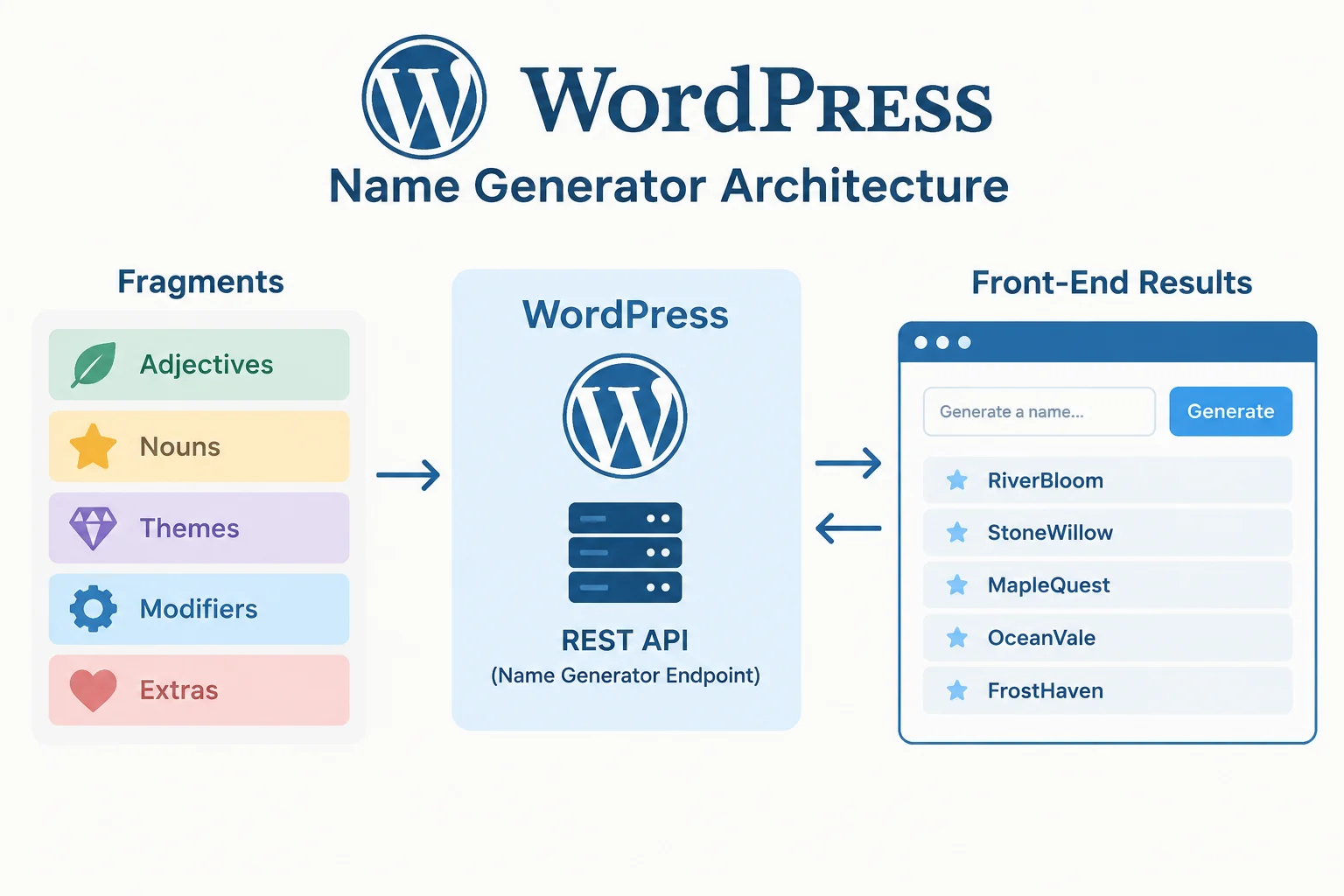
mygenify.cloud needs a utility that feels instant to visitors and remains easy for editors to curate. The clean split is: WordPress stores editable fragments and generator presets; a server-side generator applies recipes; a public REST route returns only finished names; and a vanilla-JS front end renders 10-20 results without a reload. This keeps the data model understandable and avoids turning the browser into the source of truth.
Quick decisions for the first release:
- Use a CPT such as
ng_fragmentfor editable records, post meta for scalar and structured attributes, and taxonomies for filterable facets. Do not start with a custom table. - Make gender, origin, style, and rarity taxonomies; keep syllables as a numeric meta field; keep enabled and weight as editorial controls.
- Store the generator recipe as validated JSON in
ng_generatormeta, not as executable code. - Return only generated names from REST. Never expose the fragment pool, weights, or recipe internals to the public.
- Use localStorage for guest favorites and user meta for logged-in favorites. Store fragments and favorites, not every generated name.
- Blue Studio’s documented themed AI name generators are a narrow reference. Favorites, export, and privacy controls are optional additions for mygenify.cloud, not assumed Blue Studio features. Use your own templates and visual design.
The sections below turn those decisions into a field schema, validation rules, endpoint design, and rollout checklist.
Data model and storage choice
Use ng_fragment for each literal or fragment. A fragment can be a prefix, root, suffix, joiner, or complete literal. Use ng_generator for presets that define which fragment types to combine, in what order, with which conversions and fallbacks. This gives editors a familiar admin screen and gives developers a stable repository layer.
A CPT plus post meta is the right first choice because the dataset is editorial, records are edited by hand, and WordPress already provides revisions, capability checks, admin search, and import tools. Taxonomies should carry the facets visitors filter by, because WP_Query can use tax_query efficiently. Post meta should carry scalar values such as weight, syllables, enabled state, and the recipe JSON. A common mistake is putting every attribute into post meta and then filtering with large meta_query joins; that works for a prototype but becomes awkward as the dataset grows.
JSON is useful for seed data, exports, and the generator recipe itself, but it is a poor primary store for editable records. A single JSON blob forces custom admin screens, weak concurrency, and manual indexing. A custom table is also unnecessary at launch. Move to a custom table when fragment volume makes taxonomy and meta joins dominate generation time, when you need many-to-many relations beyond taxonomies, or when imports and updates require indexed bulk operations. Keep the CPT as the admin UI if you make that move, and put generation behind a repository class so the storage layer can change without rewriting the REST route.
A practical rule: fragments and presets are content, taxonomies are filters, meta is configuration, and generated names are ephemeral. Store only fragments, presets, and explicit favorites.
Custom field schema for generation attributes
Think in three layers: parts are literals or fragments; methods are ordered candidate assembly strategies; conversions handle lowercasing, shortening, and suffixes; uniqueness and fallback can append a number or try another method. Conditions can select a pattern by an attribute such as origin or style. That model keeps the admin data simple while allowing several generator presets to share the same fragment pool.
For ng_fragment, use these meta keys:
ng_fragment_text: string, required, maximum 64 characters, sanitized as plain text.ng_fragment_type: enumliteral,prefix,root,suffix, orjoiner.ng_fragment_weight: integer from 1 to 100, default 10.ng_fragment_syllables: integer from 1 to 6.ng_fragment_enabled: boolean.ng_fragment_notes: plain textarea for editorial notes, never rendered as HTML.
Use taxonomies for multi-value, filterable facets: ng_gender, ng_origin, ng_style, and ng_rarity. A fragment can have multiple origins or styles, and visitors can filter by term slug. Keep gender as a controlled vocabulary if the product requires fixed choices; allow origin and style to grow editorially. Syllables should remain numeric meta because it is a range filter, not a category.
For ng_generator, use these meta keys:
ng_recipe_json: validated JSON object containingversion,parts,methods,conversions, andfallback.ng_result_minandng_result_max: integers, constrained to 10-20 for the public UI.ng_syllables_minandng_syllables_max: optional integer bounds.ng_enabled: boolean.ng_weight: integer for preset ordering or recommendation.ng_cache_ttl: short cache lifetime in seconds, with a sane default.
Use the ng_generator_theme taxonomy to group presets such as fantasy, modern, or historical. The recipe should reference part keys and fragment types, not individual fragment IDs, so editors can add fragments without editing every preset. Validate the recipe shape in code and reject unknown keys, excessive nesting, and oversized strings.
Admin editing, validation, and sanitization
Use ACF or Meta Box for the editing experience, but keep registration and validation in code so REST, imports, and admin screens share the same rules. Register meta with a type, single value, sanitization callback, and authorization callback. For example:
register_post_meta('ng_fragment', 'ng_fragment_type', [
  'type' => 'string',
  'single' => true,
  'show_in_rest' => true,
  'sanitize_callback' => 'ng_sanitize_fragment_type',
  'auth_callback' => function ($allowed, $meta_key, $post_id) {
    return current_user_can('edit_post', $post_id);
  },
]);
Validation should be allowlist-first. ng_fragment_type must match one of the five enum values. Numeric fields use absint and are clamped to their allowed range. Booleans use rest_sanitize_boolean. Taxonomy assignments must verify that the taxonomy is registered and that the term exists; do not accept arbitrary term strings from a request. For fixed vocabularies such as gender, compare against a code-level allowlist of slugs.
The recipe JSON needs its own sanitizer. Decode it, check json_last_error, require an object, cap the raw length, validate the version, limit the number of parts and methods, allow only known conversion names, and normalize before saving. A rejected recipe should save as an empty string or fail the request; never store partially valid JSON. A short pattern looks like this:
function ng_sanitize_recipe($raw) {
  if (!is_string($raw) || strlen($raw) > 20000) return '';
  $data = json_decode($raw, true);
  if (json_last_error() !== JSON_ERROR_NONE || !is_array($data)) return '';
  // validate version, parts, methods, conversions, fallback
  return wp_json_encode($clean);
}
Escape on output, not only on input. Use esc_html for text nodes, esc_attr for attributes, wp_kses_post only where limited HTML is genuinely intended, and wp_json_encode when passing data to JavaScript. In the front end, render generated names with textContent, not innerHTML. Never trust meta just because it came from the admin; imports and REST writes can bypass the normal editor UI.
Frontend generation via REST/AJAX
Expose a public read-only generation route such as POST /wp-json/mygenify/v1/generate. The request should send a published preset slug, a filters object, and a requested count. Validate that the preset is an enabled ng_generator, that the count is between 10 and 20, that filters are arrays of known taxonomy slugs, and that the payload size is bounded. The permission callback can be public for generation because the route does not write data, but it still needs rate limiting and strict validation.
Return only the finished names and minimal metadata. Do not return fragment IDs, weights, candidate pools, or the recipe. A response shape with a names array is enough for the UI. Put generation logic in a service class that loads the preset, queries eligible fragments, applies weighted random selection, enforces uniqueness, and uses the fallback strategy when the pool is too small. Cache the public result server-side with a key that includes the preset, normalized filters, count, and recipe version.
A vanilla-JS handler can stay small:
form.addEventListener('submit', async (event) => {
  event.preventDefault();
  const response = await fetch(MyGenify.restUrl, {
    method: 'POST',
    headers: { 'Content-Type': 'application/json' },
    body: JSON.stringify(payload)
  });
  const json = await response.json();
  list.replaceChildren(...json.names.map((name) => {
    const li = document.createElement('li');
    li.textContent = name;
    return li;
  }));
});
Add an AbortController for repeated clicks, disable the submit button while the request is running, and announce completion through an aria-live region. Keep the form usable without JavaScript by providing a clear fallback message or a server-rendered default result. The important architectural boundary is that the browser asks for names; it does not receive the name-generation dataset.
Copy and favorites without account friction
Copy-to-clipboard should be a small enhancement, not a dependency. Use navigator.clipboard.writeText when available and a temporary textarea fallback otherwise. Show a short confirmation and keep the original name visible. Do not send copied names to the server.
Guest favorites belong in localStorage under a versioned key such as mygenify_favorites_v1. Store an array of objects with the name, preset slug, and timestamp. Deduplicate by name plus preset, cap the list at a reasonable size, validate every field when reading, and handle corrupt JSON by resetting the store. Export can be generated client-side as JSON or CSV. This gives visitors a useful shortlist without forcing registration.
For logged-in users, store favorites in protected user meta such as _mygenify_favorites and expose a separate authenticated REST route with a nonce. Check is_user_logged_in() and operate only on the current user ID. Merge guest favorites into the account only after an explicit user action. If the site does not need accounts, skip this layer entirely; the localStorage version is enough for a utility site.
Privacy matters here. Do not log every generated name, and do not store generated names in post meta or a custom table. Store only the fragments, presets, and favorites the user intentionally saves. Disclose localStorage use in the privacy policy, provide a clear-favorites control, and keep analytics event names generic rather than recording generated strings.
Blue Studio reference mapping
Blue Studio’s documented examples center on themed AI name generators and general contact/feedback. That supports a narrow mapping: theme-specific presets and instant themed results. It does not establish that Blue Studio offers favorites, export, or privacy controls. Treat those as optional capabilities you may add to mygenify.cloud, not as mirrored features. Do not copy its layout, microcopy, or visual identity.
Map the themed generator capability to ng_generator presets grouped by ng_generator_theme. Map instant results to the REST route plus a vanilla-JS results list that renders 10-20 names without reload. Map filters to the taxonomies on fragments. If you choose favorites and export, implement them as your own features: localStorage for guests, user meta for logged-in users, and client-side export. If you choose a privacy note, write it around your own storage decisions and minimal logging.
Omit anything that creates friction or imitation risk: copied layout, copied microcopy, an account wall before generation, and any attempt to reproduce another site’s exact algorithm or visual identity. The goal is parity in utility, not parity in appearance. Use your own page templates, own CSS, own empty states, and own naming conventions. If a reference feature depends on a proprietary dataset or workflow you cannot inspect, treat it as inspiration for a capability and design a transparent equivalent.
Performance, caching, and security
Cache public generation responses in transients or the object cache. The key should include the preset ID, normalized filter terms, requested count, and a cache version. Increment the version when a fragment or generator is saved so old entries expire naturally. Keep the TTL short enough that editorial changes appear promptly, and cache only public, non-personalized output. Favorites are user-specific and must never share that cache.
Bound every query. Use posts_per_page with a sensible candidate cap, no_found_rows, fields => ids, and tax_query for facets. Apply weight selection in PHP after fetching a limited candidate pool. Do not use posts_per_page => -1. If the pool is too small to produce the requested count, return fewer names or use the preset fallback rather than scanning the entire dataset.
Rate-limit the public route by a hashed client identifier and a short transient counter. A modest per-minute cap with a 429 response is enough for a utility site; tune it to traffic and exclude obvious monitoring requests. Cap request body size, reject malformed filters, and avoid detailed error messages that reveal internals.
For security, use nonces and capability checks on admin and authenticated favorite routes, sanitize every meta write, escape every output, and use $wpdb->prepare if you ever add custom SQL. For performance, use Query Monitor during development and a page cache for normal pages; REST POST responses usually bypass page cache, so rely on object cache or transients. Escalate to a custom table only after profiling shows that tax/meta joins or bulk imports are the bottleneck.
Implementation checklist and plugin stack
Phase 1: register ng_fragment, ng_generator, the taxonomies, and the meta keys in a small plugin. Add ACF or Meta Box field groups for editor UX, but keep sanitization and authorization in code. Import a seed set with WP All Import or a WP-CLI command, then test invalid enums, missing terms, disabled fragments, and malformed recipes.
Phase 2: build the generator service and the public REST route. Add result-count limits, weighted selection, uniqueness, fallback behavior, transient caching, and rate limiting. Test with empty pools, one-fragment pools, repeated requests, and filters that produce no matches.
Phase 3: create your own theme templates and enqueue a vanilla-JS file. Add instant results, copy buttons, guest favorites, optional logged-in favorites, client-side export, keyboard support, and aria-live feedback. Test with JavaScript disabled and with localStorage unavailable.
Phase 4: audit with Query Monitor, confirm capability checks, review escaping, check cache invalidation, and publish a plain-language privacy note. A practical plugin stack is ACF or Meta Box for fields, CPT UI only if you prefer UI registration, WP All Import for seed data, Query Monitor for debugging, and a page/object cache appropriate to the host. Keep the stack small; the generator logic should live in your own code, not in a shortcode plugin you cannot validate.